What Launch Lab is and how it earns
What the kit builds, how a launch week runs and the ways a Launch Lab site takes money, with what visitors, makers and you each see.
Updated 9 Oct 2026 · written for Launch Lab 2.9.0
On this page
Launch Lab is a website you run yourself: a launch site for one niche. People add the thing they have made and each one goes live on a launch day. Visitors vote for the ones they like. You run all of it from the admin at /admin.
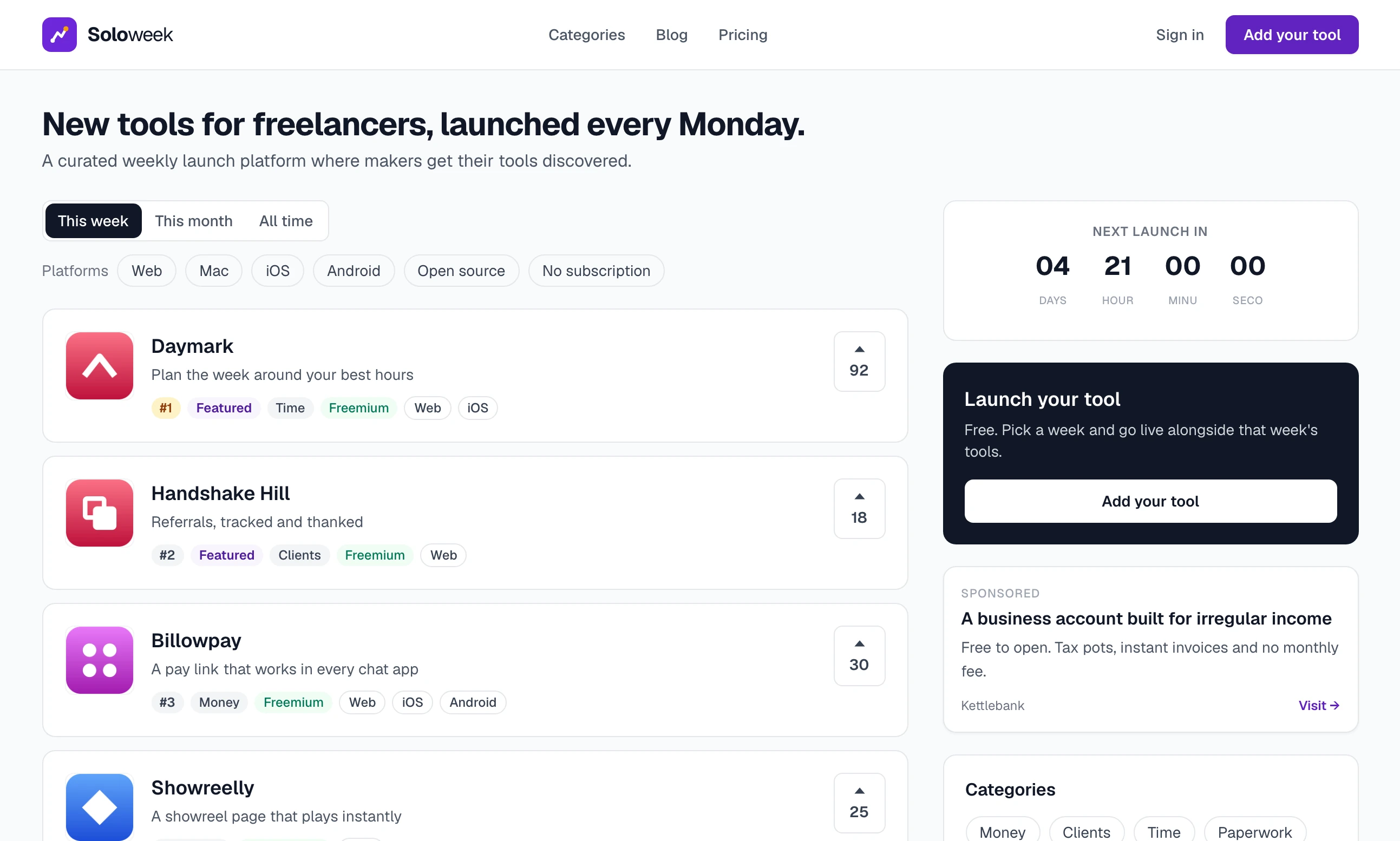
The pictures in these guides come from a made-up site called Soloweek, for tools that freelancers use. Your site uses its own words. What gets launched can be called a product, an app, a tool, a course or anything else, and the person who launches it a maker, a developer or a founder. These guides say "listing" and "maker".
Who it is for#
Launch Lab is for someone who wants to run a launch site as a small business. You pick the niche, name the categories, decide how often things launch and set the prices. Adding a listing is always free. Makers pay for extras, and advertisers pay for a place on your pages.
You do not need to be a developer. Day to day you work in the admin. A few jobs, such as installing the site and putting it on a server, are done with terminal commands, and the guides give each command exactly.
A launch week in one paragraph#
A new site launches weekly. A maker creates an account, writes a listing and picks a week. Each week has a set number of free places, 10 to begin with, and a set number of paid places, 5 to begin with. On launch day, Monday at 09:00 UTC unless you change it, every listing booked for that week goes live together and the home page turns over to the new week. Anyone who is signed in can vote, once for each listing, and the week's listings are shown in order of votes. The other way to run the site is rolling: there are no weeks and each listing goes live on its own. How launches work covers both.
The ways it earns#
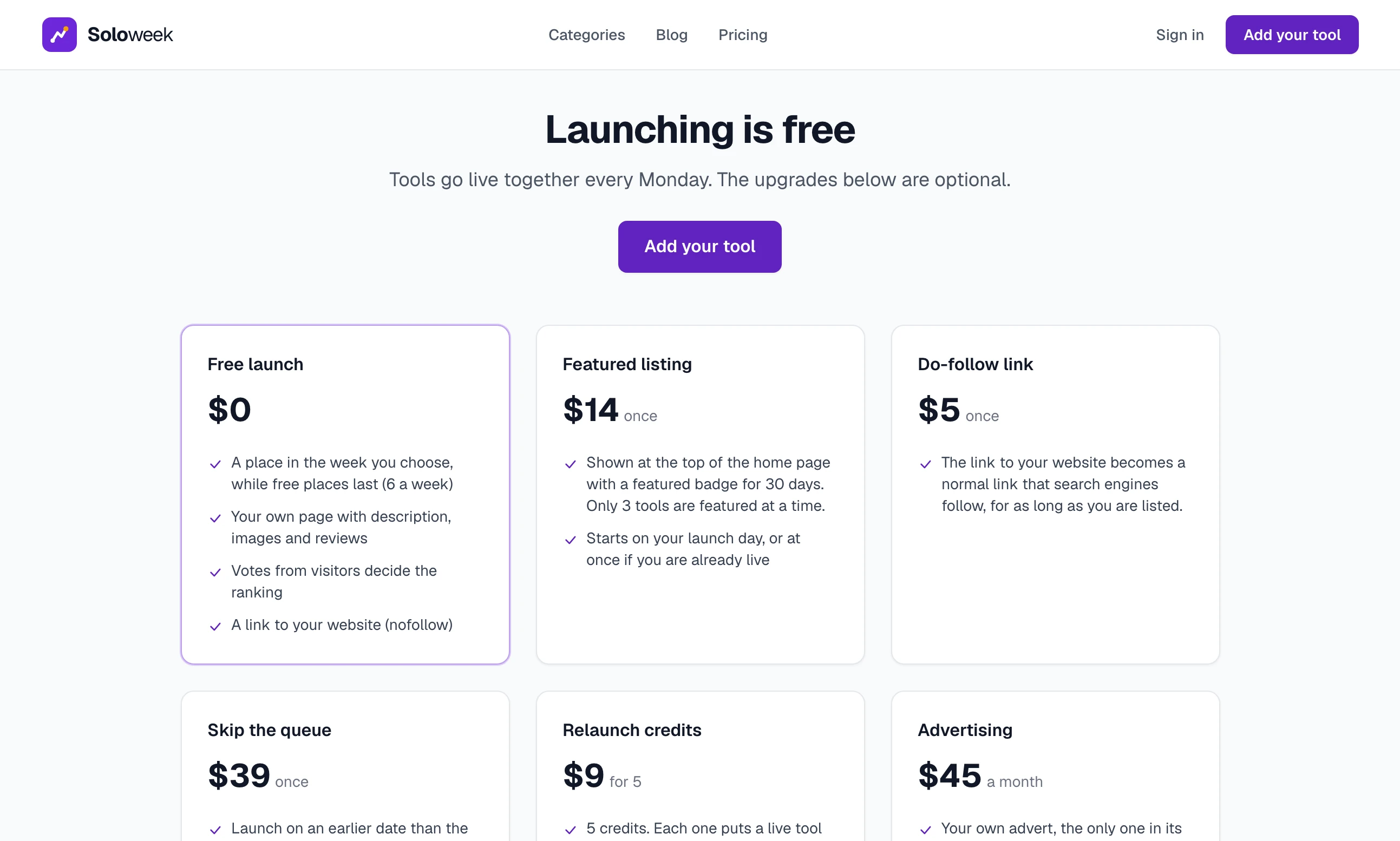
Everything here is switched on and priced by you. The prices below are the ones a new install starts with.
| What you sell | Who pays | Starting price | Guide |
|---|---|---|---|
| Featured listing | A maker, to be shown first on the home page | 14.00 | Featured listings and vouchers |
| Do-follow link | A maker, for a link that search engines follow | 5.00 | What you sell and your prices |
| Skip the queue | A maker, to launch in an earlier week | 39.00 | What you sell and your prices |
| Relaunch credits | A maker, to put a live listing back in a future week | 9.00 for 5 | What you sell and your prices |
| Advertising | An advertiser, for their own advert on your pages | 45.00 a month | Sell advert places |
| Google AdSense | Google, for adverts it places on your pages | Set by Google | Sell advert places |
Paid extras on a listing. A do-follow link turns the link to the maker's website into one that search engines follow, for as long as the listing is on the site. Skip the queue lets a maker launch on an earlier date than the next free place, and includes a do-follow link. Relaunch credits each put a live listing back into a future week's list with its votes and reviews kept. A new account is given 3 credits free, so this one only sells to makers who come back often. A rolling site sells two others in place of the weekly ones: Bump, which moves a live listing back to the top of the newest list, and Fast-track review, which has a listing checked ahead of the others when you check listings before they go live. You type each price in the admin and Stripe charges that amount: there are no products or price IDs to create in Stripe. See What you sell and your prices.
Featured listings. A featured listing sits at the top of the home page with a Featured badge for 30 days, whichever week it launched in. Only 3 listings are featured at a time, and both numbers are settings. The limit is what makes a place worth paying for, and it also caps what this can earn in a month. A voucher takes a percentage off a featured listing, and the site offers the newest active voucher to a maker in the email that says their listing is live. See Featured listings and vouchers.
Advertising. An advertiser writes their own advert on your site and pays a monthly subscription. There are two places an advert can run, beside the list on the home page and on a listing's page, and each place shows one advert at a time. When the subscription stops, the advert stops showing. Two places is the whole stock, so this is a small, steady line and not a large one. See Sell advert places.
Google AdSense. Separately from your own advert places, you can show Google's adverts and be paid by Google. You need an AdSense account that Google has approved for your domain, and the kit starts with AdSense switched off. What it pays depends on your visitors and on Google, not on anything in the kit. It is set up under Google AdSense in the admin and covered in Sell advert places.
What a visitor sees#
A visitor needs no account to browse.
The home page has your heading and the listings of the current week in order of votes, featured ones first. Tabs switch between This week, This month and All time. Beside the list are a countdown to the next launch, the advert place, the categories and the most voted listings.
A listing page has the logo, a one-line description, pictures, the full description, key features, a panel about the maker and reviews.
Categories, Blog and Pricing are in the menu at the top.
The first three listings in a list carry the chips #1, #2 and #3. They show the position in that list and nothing more.
To vote, a visitor creates an account and signs in. A review can be left without one.
What a maker sees#
A maker signs up, clicks the button to add a listing and fills in the listing editor, which previews the listing as it is typed. They then pick a launch week, or pay to launch sooner if you sell that.
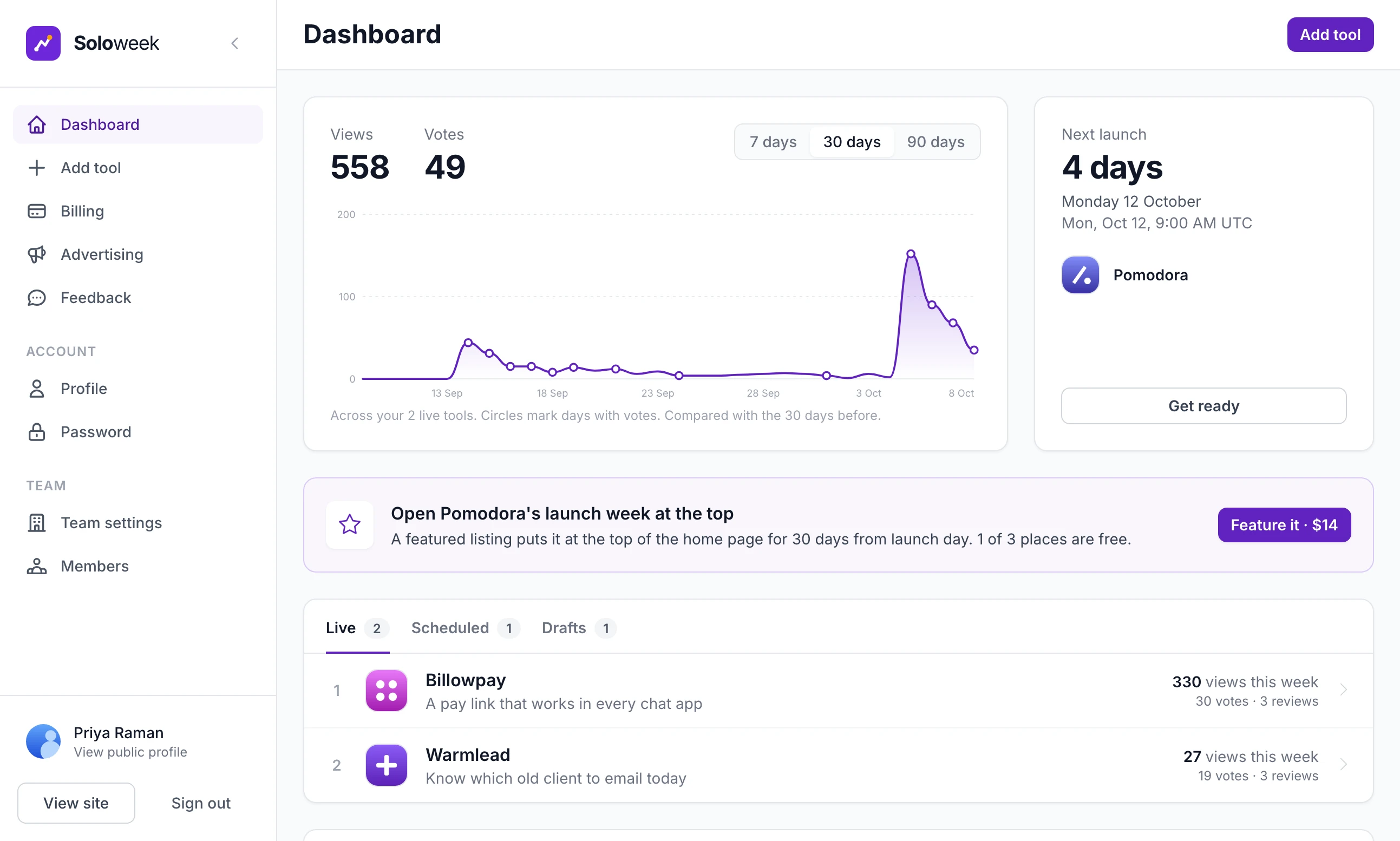
After that they work from their own dashboard. It has their listings and where each one stands, their views and votes, and two pages for money: Billing for the extras they have bought and Advertising if you sell advert places. It is separate from your admin and shows only their own things. What a maker sees goes through it.
What you see#
You sign in and open /admin. The first screen is the Control Panel, with a list of what is left to set up, your totals and charts for sign-ups, launches and revenue. A sidebar leads to every other screen.
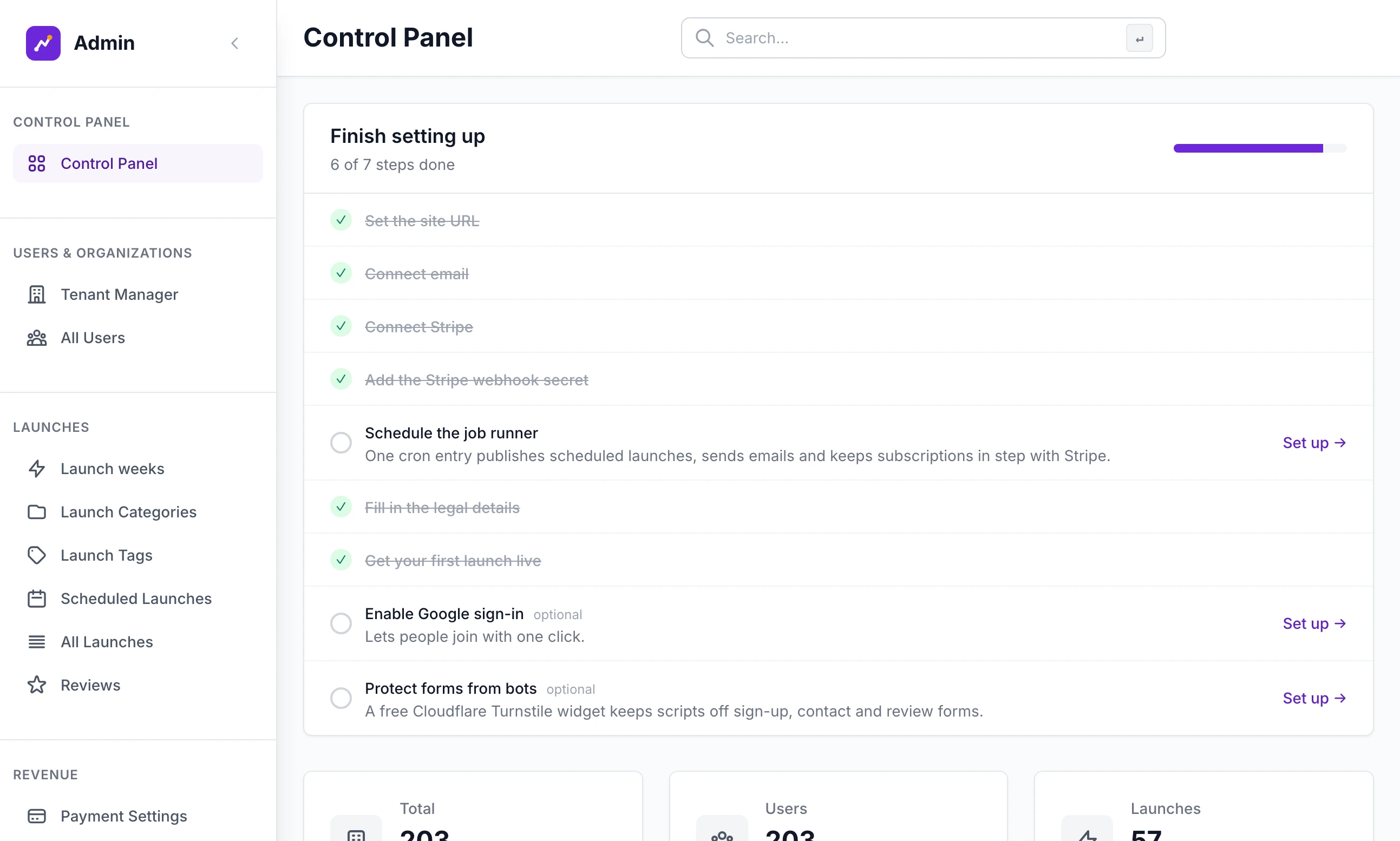
A tour of the admin goes through the sidebar section by section.
What it needs to run#
Python 3. The kit's own Dockerfile runs it on Python 3.12. The packages are listed in
requirements.txtand installed with one command.A database. With no settings at all, the site keeps everything in one SQLite file,
instance/app.db, which it makes itself. For a busy live site it can use PostgreSQL instead, and the driver for that is already inrequirements.txt.
That is all you need to see the whole product on your own computer. Three more things come in when the site goes live:
A Stripe account, when you want to take money.
An email account that can send by SMTP, when you want the site to send email. Until then, the links for confirming an address and resetting a password are written to the server log and not sent.
One scheduled job on the server. It publishes the launches booked for the day, ends featured listings when their time is up and sends queued email. See Backups and scheduled jobs.
Google sign-in, the Cloudflare Turnstile bot check and AdSense are optional, and each needs its own account with that service.
What is not in it#
So that you do not go looking:
No AI features. Nothing in the kit writes, rewrites or scores a listing, and it calls no AI service.
No newsletter list. The site emails people who have an account, through campaigns and automations. There is no separate list of subscribers. The contact form has a tick box, "Subscribe to our newsletter for product updates and launch tips", and all it does is add a line to the email you receive about that message.
No winners or awards. No listing is declared the winner of a week, and no badge or email announces one. The #1 to #3 chips are position in a list.
No leaderboard page. The rankings are the lists on the home page and on each category page.
Where to go next#
- Install Launch Lab on your computerGet the site running, from the unzipped folder to the setup wizard.
- The setup wizard, step by stepSeven short steps that name the site, pick its look and set what you sell.
- Connect StripeNeeded before a maker or an advertiser can pay you.
Can I run it without selling anything?
Yes. Every paid extra has its own tick box, advertising has its own switch and AdSense starts switched off. With all of them off, and with no Stripe key saved, the site is a free launch site.
Do makers have to pay to launch?
No. Adding a listing and launching it in a free place costs nothing, and the kit has no setting that charges for it. Makers pay only for the extras you choose to sell.
Does it have to launch weekly?
No. Weekly is what a new site starts with. You can choose rolling in the setup wizard, or change later in Site Settings on the Launching tab. How launches work compares the two.
Can one site cover more than one niche?
It is built around one. The site has one name, one set of categories and one pair of words for a listing and its maker. To cover a second niche, run a second copy of the kit.
Stuck on a step? Send a message.