Troubleshooting
The problems Launch Lab owners meet most often, each with what causes it and how to fix it.
Updated 9 Oct 2026 · written for Launch Lab 2.9.0
On this page
- Where the logs are
- The page will not load on a Mac
- The wizard asks for a setup code
- "/setup" says the page was not found
- Every page sends me to the setup wizard
- The site stops at start over SECRET_KEY
- A maker paid and nothing happened
- Listings are not going live
- Emails are not arriving
- Sign-in with Google fails
- A voucher is refused
- Uploads fail or are too large
- I forgot the admin password
- The cron line on the System page does not work
- The site still says "Coming soon" after I opened it
- "Your session expired. Reload the page and try again."
- "Slow down there!"
- "The database is not available. Check DATABASE_URL and the server log."
Find your problem in the headings below, or search for the words of the error message. Each entry says what causes it and what to do. The examples use a site called gadgets on a server set up with deploy.sh. The guides say "listing" and "maker": your site uses its own words for both.
Where the logs are#
Most entries below send you to the log. Where that is depends on how the site runs.
| Install | The site's log |
|---|---|
| Your own computer | The terminal where python run.py is running. The site writes no log file of its own. |
deploy.sh | scripts/deploy.sh logs gadgets shows the last 200 lines and keeps following. scripts/deploy.sh status says which sites are up. |
| Docker Compose | docker compose logs app for the site and docker compose logs jobs for the job runner. |
The job runner on a
deploy.shserver writes tosites/jobs.log, and the backup tobackups/backup.log. Both are files on the server's disk.Three jobs keep files of their own in the kit's
logsfolder:email_automation.log,daily_stats.logandsecurity_cleanup.log.In the admin, a failed job shows its reason on the System page, and Audit Log under Tools lists every change made in the admin.
The page will not load on a Mac#
python run.py uses port 5000, and on a Mac that port is often taken by AirPlay Receiver. Put this line in the .env file in the kit's folder, start the site again and open http://127.0.0.1:5050:
FLASK_PORT=5050The wizard asks for a setup code#
The wizard opens without a code in one case only: a browser on the same computer as a site started with python run.py. Under gunicorn, under Docker, behind a proxy or from another computer, it shows "Enter your setup code" first.
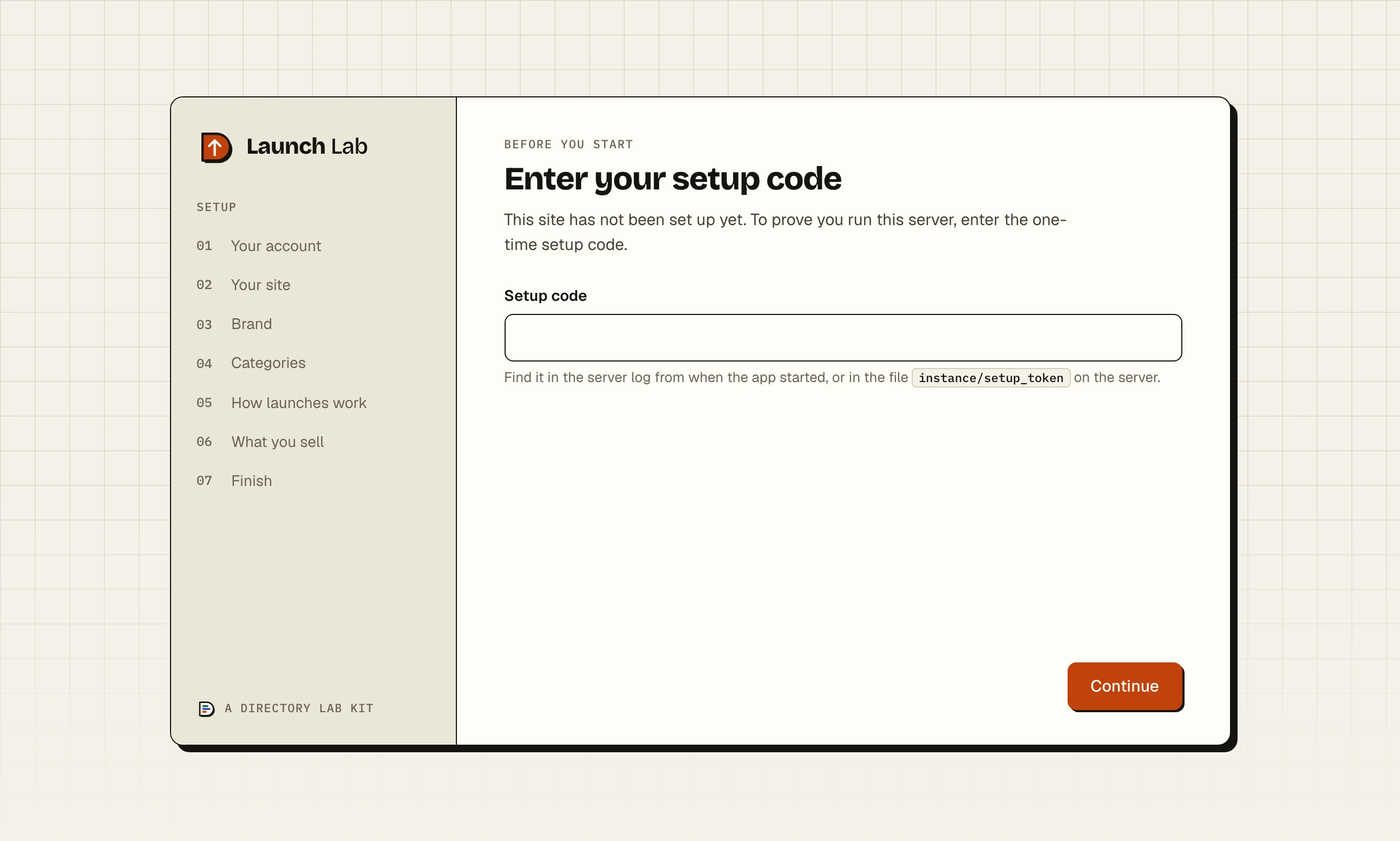
The code is made the first time the site starts. Find it in one of these places:
The log, in a line that begins "Setup required: open /setup in your browser. Setup code:".
The file
instance/setup_token. Underdeploy.shthat issites/gadgets/instance/setup_token.The link
add-siteprinted, which carries the code in the address.
"That setup code is not correct." means it was mistyped or belongs to another site: each site has its own. The page takes 60 tries an hour.
"/setup" says the page was not found#
Setup is finished. Once an admin account exists the wizard is closed for good, and its address answers "Oops! Page Not Found". Sign in at /auth/login. If you do not know which account is the admin, the password script prints its email address.
To start again from nothing on your own computer, stop the site, delete instance/app.db and start it. The wizard comes back.
Every page sends me to the setup wizard#
The site is reading a database with no admin account in it, which almost always means a new, empty one. The instance folder was deleted, moved or not carried through an update, or DATABASE_URL now points somewhere else. Do not complete the wizard if you expected your own data: put the database back first.
The site stops at start over SECRET_KEY#
The message is:
SECRET_KEY is a placeholder or too short. Generate one with: python -c "import secrets; print(secrets.token_hex(32))" (or remove SECRET_KEY from .env to have one generated in instance/secret_key)The SECRET_KEY line in .env is shorter than 16 characters, or begins with change-me, changeme, your-, your_, secret-key or dev-secret. On a new site, delete the line and the site makes its own key in instance/secret_key, or run the command in the message and paste what it prints. Under Docker a site with this fault starts and stops over and over, and status shows it as DOWN.
A maker paid and nothing happened#
A one-off purchase, such as a featured listing, a do-follow link, a paid place or relaunch credits, is applied when Stripe calls the site's webhook. The page the maker comes back to says "Payment received. Thank you!" either way.
Open Integrations under Tools and find the Stripe payments card. It shows the address Stripe must call, which ends /payments/webhook, and has the box Webhook signing secret.
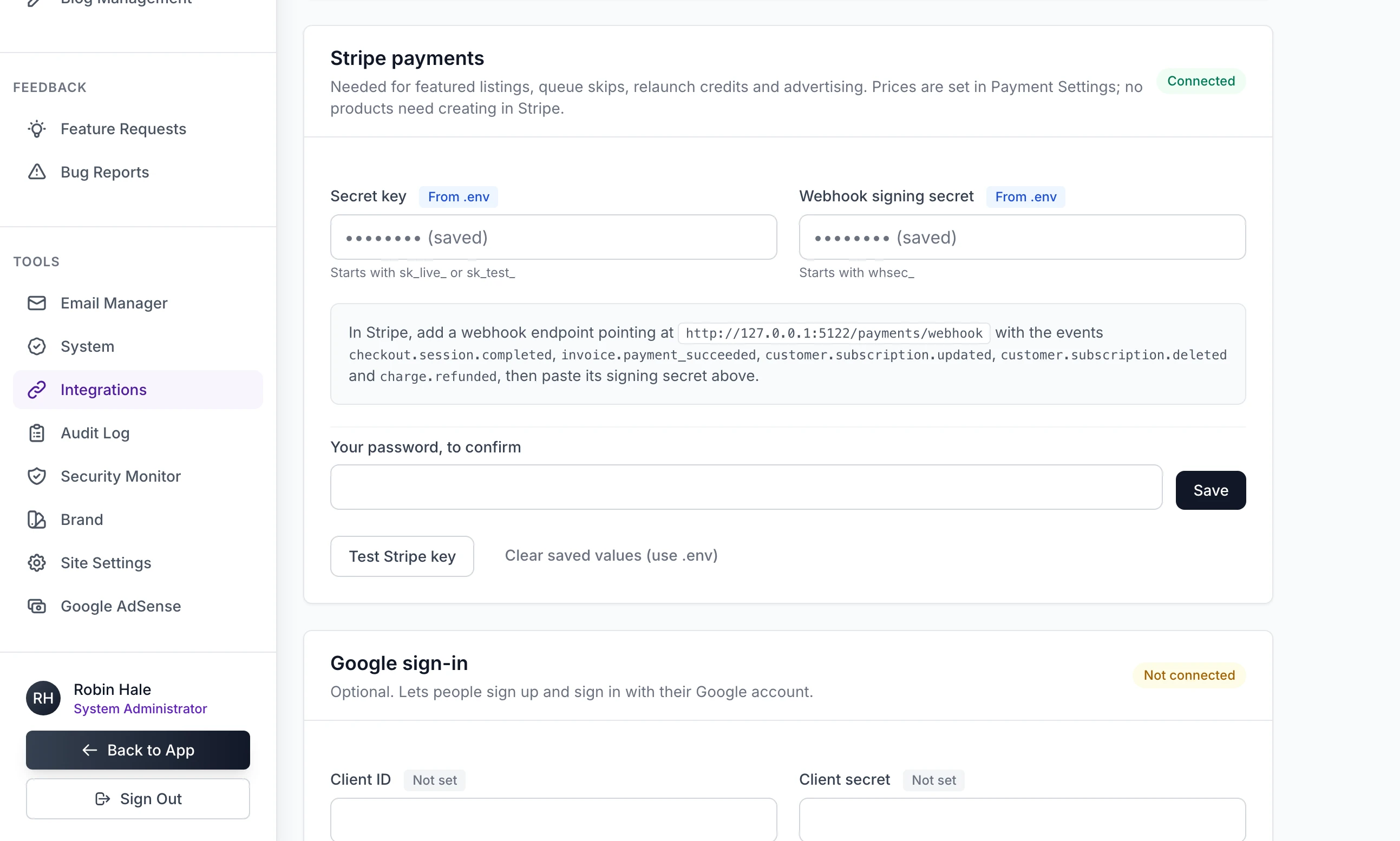
Then read the site's log for one of these:
| The log says | Cause |
|---|---|
| "Stripe webhook received but STRIPE_WEBHOOK_SECRET is not set" | No signing secret is saved. |
| "Invalid signature in Stripe webhook" | The saved secret belongs to a different endpoint, or to test mode while the payment was live. |
| "could not be applied" | The site failed while applying the purchase. It tells Stripe so, and Stripe sends the event again. |
| Nothing | Stripe is not reaching the site. The address in Stripe is wrong, or the site is on your own computer, where Stripe cannot call it. |
When the cause is fixed, send the event again from the endpoint's page in Stripe. The purchase is applied then, and a repeat of an event already applied is ignored. Adverts differ: an advert goes live when its buyer lands back on the site, and the Advert subscriptions job checks each one against Stripe once a day. Connect Stripe covers the webhook from the start.
Listings are not going live#
On a weekly site, a booked listing goes live when the Scheduled launches job runs: once a day, on the first pass at or after the launch hour. That hour is in UTC. It is Hour (UTC, 0 to 23) on Payment Settings.
Open System under Tools and read Last run (UTC) for that job.
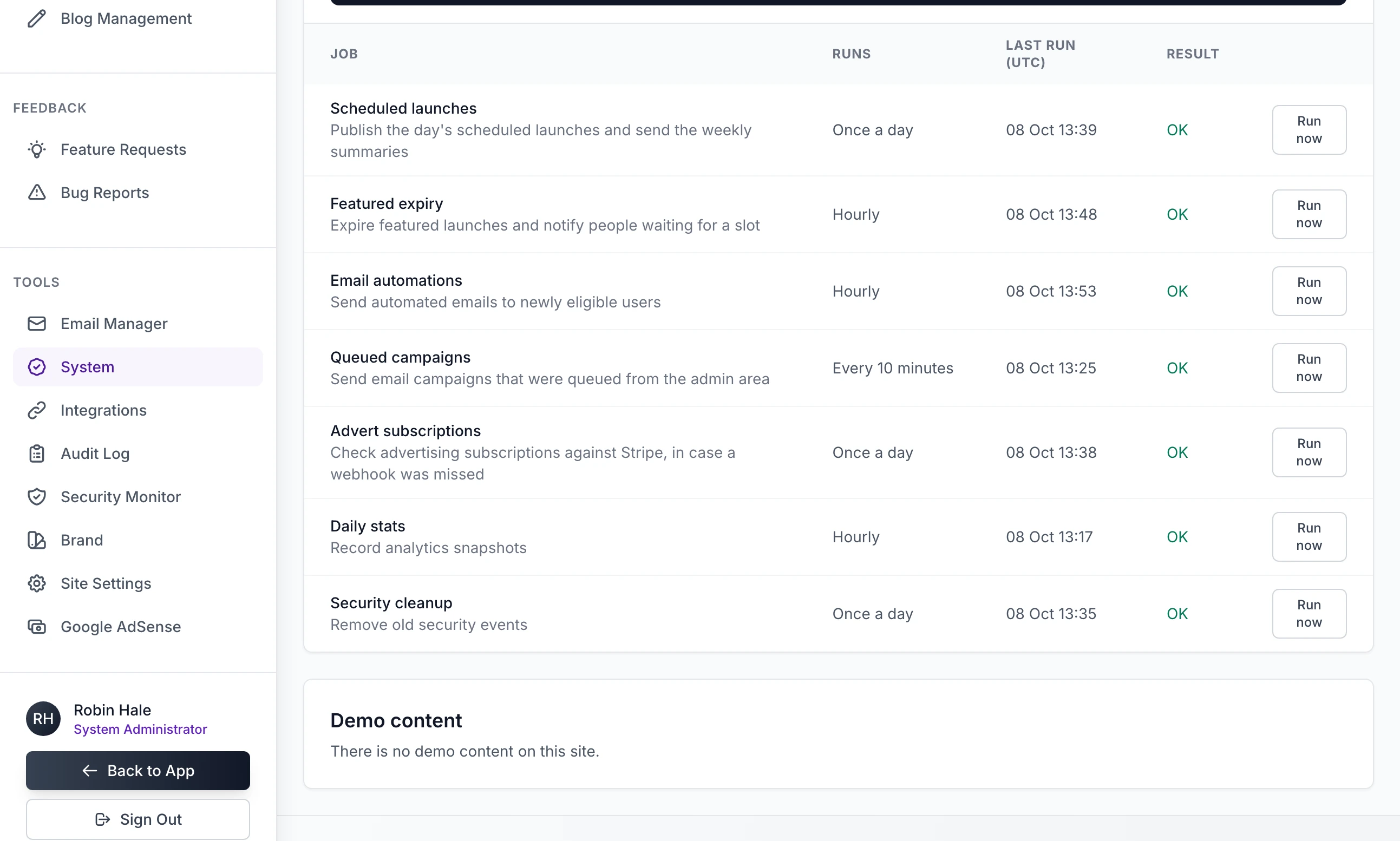
"Never" in every row: nothing is calling the job runner. On your own computer nothing ever does. On a server, see what runs the jobs.
A time, with "Failed": hold the pointer over "Failed" to read the reason.
To publish at once, click Run now on that row. Bookings from days the job missed go live then.
On a rolling site with checking switched on, a listing waits in Review queue under Launches until you approve it. No job is involved.
Emails are not arriving#
No mail server is saved. The Email (SMTP) card on Integrations reads "Not connected". The site sends nothing and writes each email to the log in a line that begins "Email is not connected - not sent to", with the address, the subject and the link the email would have carried. You can copy a verification or reset link from there.
The mail server refuses. Click Send test email to and your address on that card. It answers "Test email sent to" or "The mail server refused the message:" and the reason. A failure while the site is running is in the log as "Failed to send email to".
Campaigns and automations wait for the job runner. They are sent by the Queued campaigns and Email automations jobs: see Listings are not going live.
Email and the emails the site sends covers the mail server and the records that keep mail out of spam.
Sign-in with Google fails#
The sign-in page says one of these:
"Google sign-in is not set up on this site. Use your email below.": the Client ID and Client secret are not both saved on Integrations.
"Google sign-in did not complete. Try again, or use your email below.": the person cancelled at Google, or the site could not check Google's answer. The log has the reason, in a line beginning "Google sign-in callback failed" or "Google sign-in could not start".
"That took a little too long. Start again with the Google button.": a new person has 15 minutes to finish their profile.
"Google has not verified that email address" and "That email address already has an account here" mean what they say.
If Google shows an error page of its own about the redirect address before anyone comes back to your site, the address registered at Google does not match the one the site sends. The site builds it from Site URL on the General tab of Site Settings and shows it on the Google sign-in card, ending /auth/google-callback. Copy it from there exactly. That card also says: "Until the consent screen is published, only the test users you list there can sign in." See Google sign-in, bot protection and analytics.
A voucher is refused#
The featured listing page answers with one of these:
"Voucher code not found.": the code was mistyped.
"This voucher code is no longer valid or has expired.": the voucher is disabled, used up, past its end date or not yet started. It also says this when the voucher has no coupon at Stripe, because it was made while Stripe was not connected. You were told so when you made it: "Voucher saved, but Stripe did not create its coupon". Connect Stripe, delete the voucher and create it again.
"This voucher is not valid for featured listings.": vouchers take money off a featured listing and nothing else.
See Featured listings and vouchers.
Uploads fail or are too large#
A page reading "413 Request Entity Too Large": everything sent in one save was over the limit, which is 12 MB behind the nginx that
deploy.shsets up and 16 MB otherwise. Add large images one at a time. Upload size says how to raise it."The logo must be a PNG, JPG, GIF or WebP image." for a file that is one: the site says the same thing when it cannot write the file. Look in the log for "Error saving file". Under
deploy.shthe cause is usually files copied into the site's folder asroot. Hand them back to the user the site runs as:
chown -R 1000:1000 sites/gadgets/instanceAnother kind of file: logos and images must be PNG, JPG, GIF or WebP.
I forgot the admin password#
Click Forgot your password? on the sign-in page. If the site can send email, the link arrives. If it cannot, the link is in the log: see Emails are not arriving.
Or set a new one from the terminal. The script prints the admin's email address, asks for a new password twice and unlocks the account:
python scripts/change_admin_password.pydocker exec -it launchlab-gadgets python scripts/change_admin_password.pydocker compose exec app python scripts/change_admin_password.pyIt changes the first admin account it finds. If you have several, check the email address it prints.
Add
--show-onlyto see the account and change nothing."Account is locked. Try again in 30 minutes." follows five wrong passwords. Setting a new password this way clears the lock.
scripts/create_system_admin.py does not create an account, whatever its name. It turns an account that already exists into an admin, which is how you give a second person the admin: python scripts/create_system_admin.py [email protected]. With --list in place of the address it lists every account.
The cron line on the System page does not work#
The System page prints one line whatever the install: cd into a folder, then .venv/bin/flask --app run.py jobs run. Under Docker that folder is /app, which is inside the container and not on the server. Do not add the line there: deploy.sh installs its own cron line and Compose runs a jobs container. Without Docker, change .venv to the name of your virtual environment. See what runs the jobs.
The site still says "Coming soon" after I opened it#
The site's .env has the line MAINTENANCE_MODE=1, which add-site --closed writes. It keeps the site closed whatever Site Settings says, and scripts/deploy.sh status shows "(coming soon)" beside the site. Remove the line:
scripts/deploy.sh set-env gadgets MAINTENANCE_MODE=See Opening day.
"Your session expired. Reload the page and try again."#
The form was opened before you last signed in or out. Reload the page and send it again. If every form says this and nobody can stay signed in, the site is being reached over plain http while SESSION_COOKIE_SECURE=true is set, so the browser will not keep the sign-in cookie. Open the site by its https address.
"Slow down there!"#
The site limits how often one address may try certain things: 30 sign-in attempts in 10 minutes, 10 new accounts an hour and 5 password reset requests an hour. Wait and try again. If many visitors see it at once on a server, the site is treating them all as one address: set TRUSTED_PROXIES=1, as in the settings that matter on a server.
"The database is not available. Check DATABASE_URL and the server log."#
A new site could not reach its database. Check the DATABASE_URL line in .env, and that the database server answers from where the site runs. The address /health says "status":"ok" once it can.
Stuck on a step? Send a message.