Sponsors, banners and AdSense
Fill your ad space without the shop. Add sponsors you have arranged yourself, paste in an ad network's code, publish ads.txt and place banners of your own.
Updated 9 Oct 2026 · written for Job Lab 1.1.0
On this page
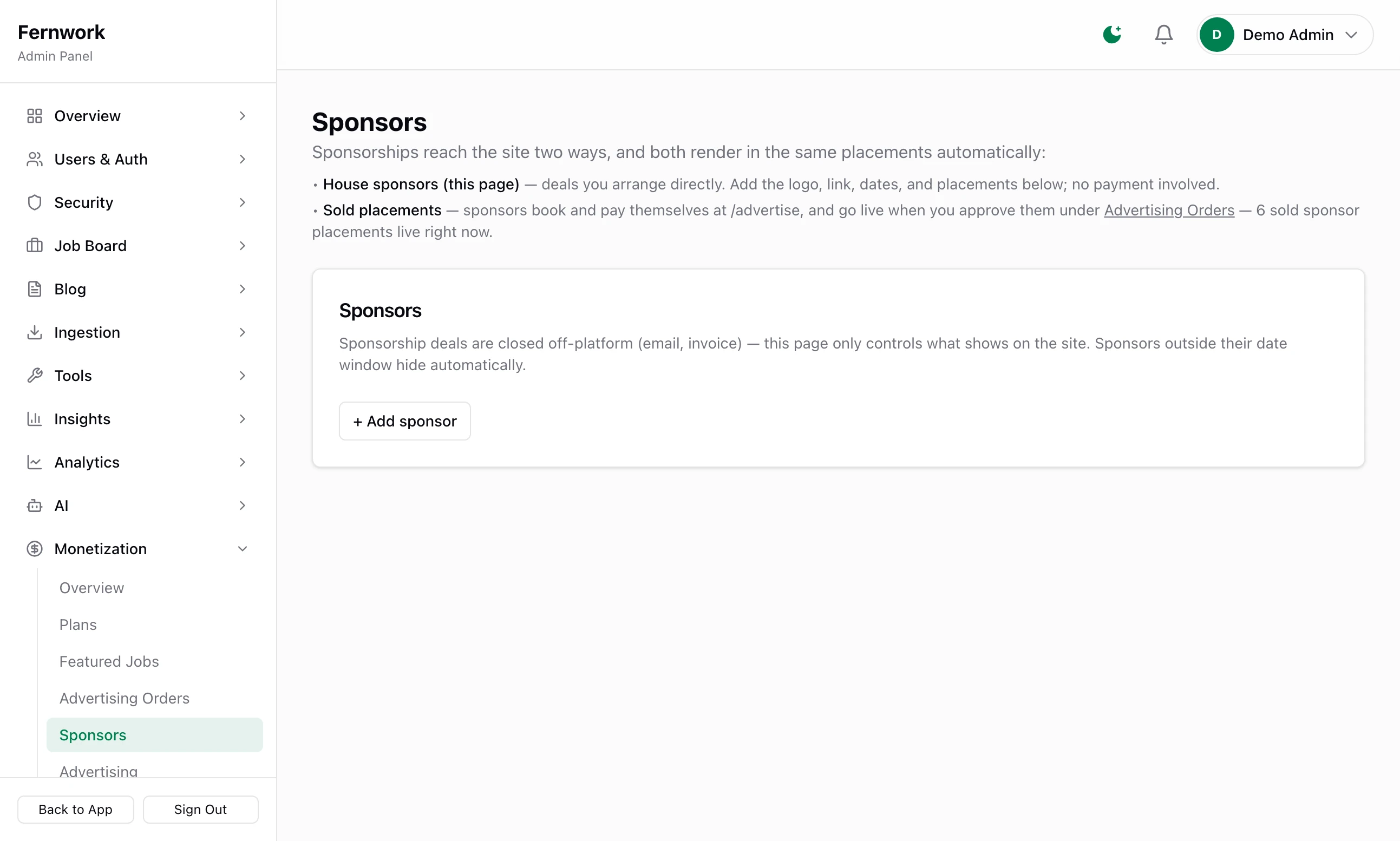
Two screens under Monetization in the admin sidebar fill ad space with no payment passing through your board. Sponsors is for deals you arrange yourself, by email and invoice: you add the logo and say where and when it shows. Advertising is for an ad network's code, such as Google AdSense, and for banners of your own. Neither needs Stripe. Nothing shows on the site until you set it up here.
Selling the same spaces for money, with the advertiser booking and paying alone, is The advertising shop. Both can run together: When a paid order wants the same space says which one shows.
Add a house sponsor#
Open Monetization, then Sponsors. A sponsor added here is a house sponsor: you were paid some other way, or not at all.
Step 1: Click + Add sponsor
A new card appears, with Active ticked.
Step 2: Fill in who they are
Sponsor name: required. It is shown in place of a missing logo on the home page, and beside the logo in a sidebar and on the stats pages.
Link (their website or offer): where a click goes. It opens in a new tab.
Tagline (optional): one line about them, up to 160 characters.
Step 3: Upload the logo
Click Upload logo and choose an image file of up to 5 MB. It is shrunk to fit 400 by 120 pixels. Remove logo takes it off again.
Step 4: Set the dates
Starts (optional) and Ends (optional, shows through this day). Leave both empty for a sponsor with no end. Outside its dates a sponsor hides by itself and comes back if you change them.
Step 5: Tick where it shows
Under Where it shows, tick any of the four placements in the table below. A new card starts with the home page ticked.
Step 6: Click Save sponsors
The bar at the bottom of the screen reads "Sponsors saved — live immediately." The mark beside Active reads Showing now, or Hidden if the sponsor is unticked or outside its dates.
You can keep up to 20 sponsors. Untick Active to rest one without losing it, or click Remove to delete it. Saving with an unnamed card answers "Every sponsor needs a name."
Where a sponsor shows#
| Tick | Where it appears | What it needs first |
|---|---|---|
| Homepage sponsors section | A row of logos on the home page, under a heading and a small "Sponsored" tag | A Sponsors section on the home page |
| Sidebar | A card in the sidebar with logo, name and tagline, marked "Sponsored" | A sidebar that is switched on and holds a Sponsor widget |
| Newsletter | The sponsor line of the weekly newsletter | Nothing |
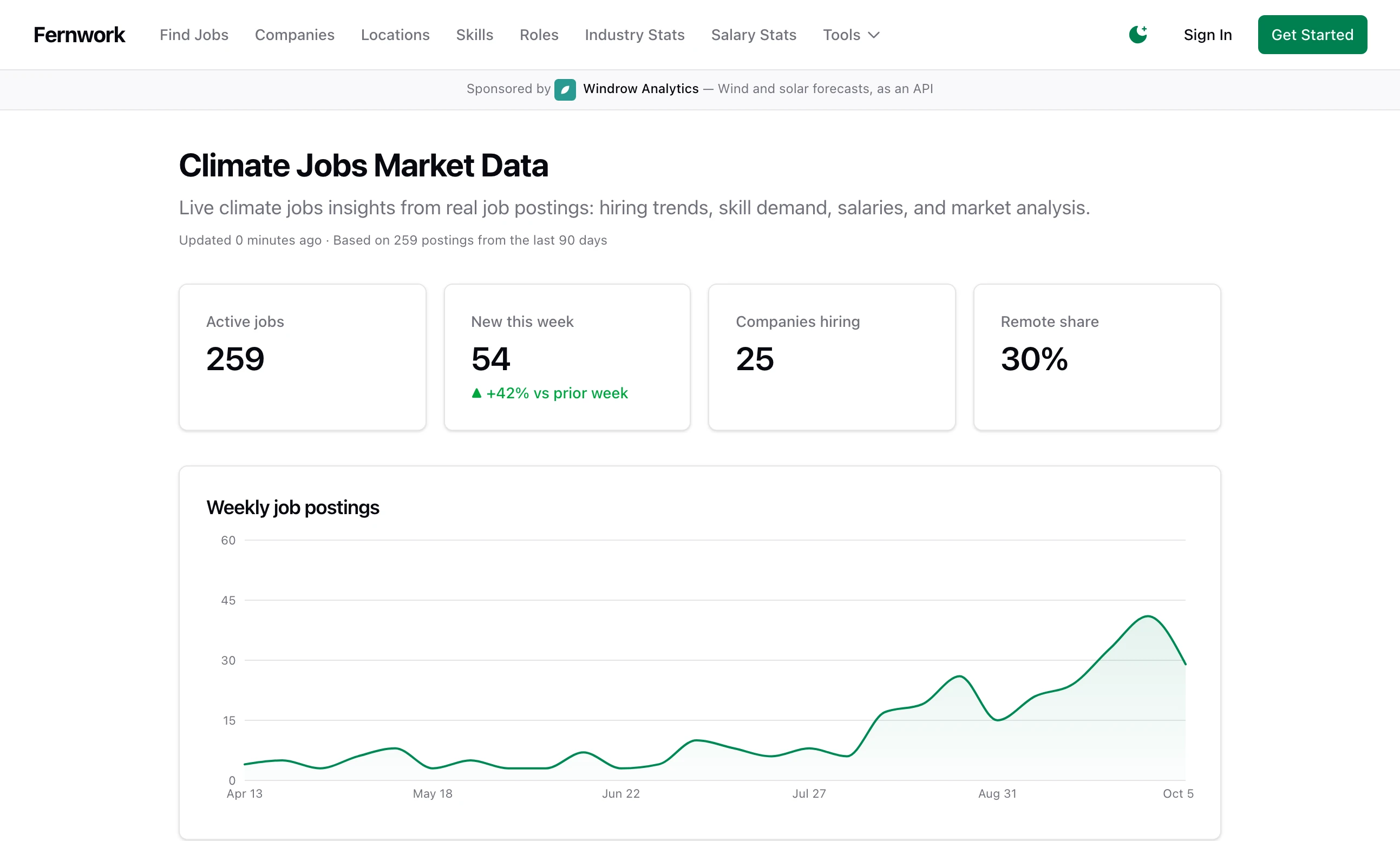
| Stats pages banner | A strip across the top of every market stats page: "Sponsored by", the logo, the name and the tagline | Nothing |
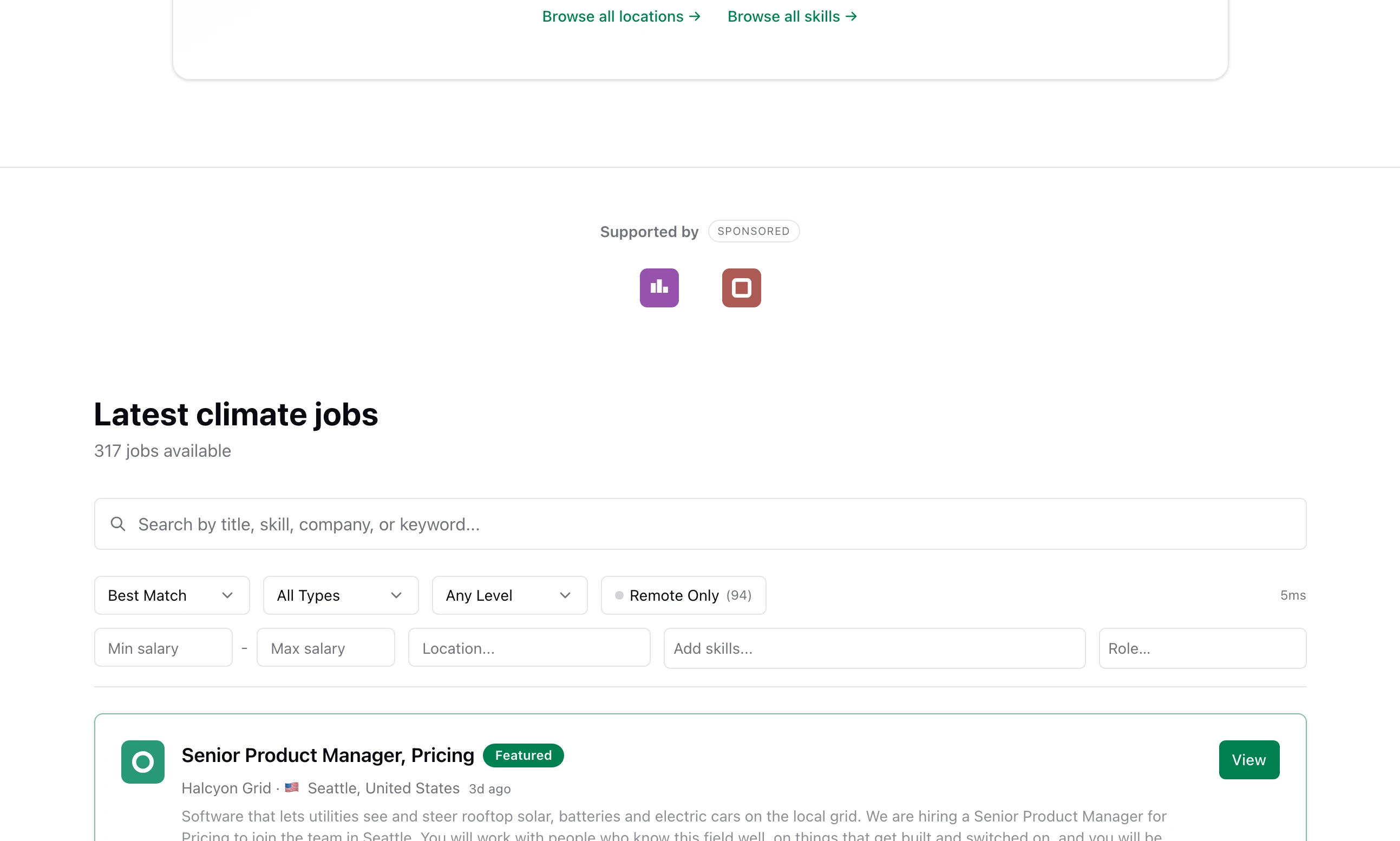
Every sponsor ticked for a placement shows there together. The exception is the newsletter, which has room for one.
Add Google AdSense or another network#
An ad network gives you two things: a script that goes on every page, and a line for a file called ads.txt. Both go on Monetization, then Advertising.
Step 1: Copy your code from the network
For AdSense, sign in to the AdSense site and copy the code snippet it gives you under Ads. The snippet contains your publisher ID, which looks like
ca-pub-followed by digits.Step 2: Paste it under Site-wide scripts
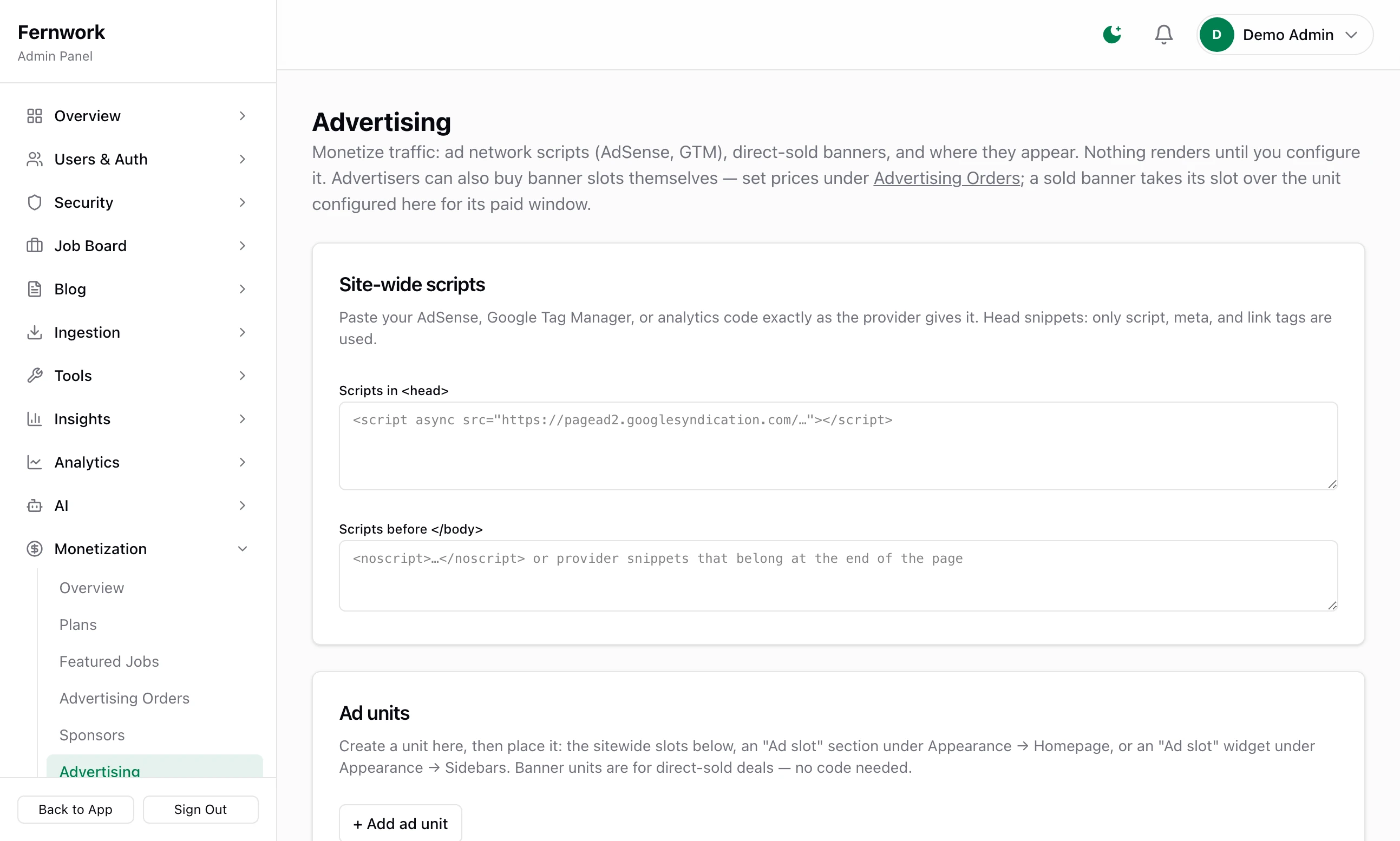
Paste the snippet into Scripts in
<head>, exactly as the network gave it.Step 3: Paste the ads.txt line
AdSense also gives you a line that looks like this, with your own publisher number in it:
ads.txtgoogle.com, pub-0000000000000000, DIRECT, f08c47fec0942fa0Paste it into the box under ads.txt, one line for each network.
Step 4: Click Save advertising settings
The bar reads "Advertising settings saved — live immediately." The script is in the next page anyone loads.
The two script boxes behave differently:
Scripts in
<head>: onlyscript,metaandlinktags are used. Anything else in the snippet is left out. This is the place for AdSense, a tag manager's main script, an analytics script or a site verification tag.Scripts before
</body>: put in exactly as typed, at the end of the page. Use it for anything the first box drops, such as thenoscriptpart of a tag manager.
Each box holds up to 20,000 characters.
ads.txt#
What you type in the ads.txt box is served, as plain text, at the address ad networks look for:
https://your-domain.com/ads.txtWhile the box is empty that address answers "Not found". Open it in your browser after you save to check the line is there.
Ad units#
The site-wide script loads the network. An advert itself is an ad unit: something you create once and then place. Under Ad units, click + Add ad unit, give it a name and choose its kind.
| Kind | What you give it | Use it for |
|---|---|---|
| Banner (image + link) | Upload image, a Click-through link and Alt text | A banner you sold or made yourself. No code. |
| Ad code | The code for one advert, pasted into Ad code (from your ad provider) | A unit from AdSense or another network |
A banner image can be up to 5 MB and is shrunk to fit 1200 by 400 pixels. Ad code can be up to 10,000 characters. You can keep up to 12 units, and each needs a name: saving without one answers "Every ad unit needs a name."
Wherever a unit shows, it sits under the small word "Advertisement". A unit you have not placed shows nowhere. There are three places to put one:
one of the three sitewide placements, below
an Ad slot section on the home page, under Appearance, then Homepage
an Ad slot widget in a sidebar, under Appearance, then Sidebars
The three sitewide placements#
Under Sitewide placements, each of three lists chooses one of your units, or — Off —.
| List | Where the unit shows |
|---|---|
| Top of every page | A slim strip under the site header |
| Bottom of every page | Above the footer |
| Job pages | Below the job description, on every job page |
Top and bottom show on every public page. They are left off the admin, the employer and job seeker dashboards, the sign-in pages, the setup wizard and the widgets other sites embed.
If you delete a unit that a placement still points at, the placement shows no advert. It does not break the page.
When a paid order wants the same space#
The shop sells the same spaces. This is what happens when an order you approved and something you set up here meet.
| Space | Who shows |
|---|---|
| Top, bottom and job page banners | The paid banner, for the dates it was bought. Your own unit comes back by itself when the order ends. A paid Site-wide sponsor takes all three in the same way. |
| Home page, sidebar and stats page sponsors | Everyone. Paid sponsors come first, then your house sponsors. |
| Newsletter sponsor | One only. A paid sponsor wins over a house sponsor. |
| Ad slot sections and widgets | Always your own unit. The shop does not sell these. |
House sponsors do not use up the places you sell. If the shop offers four home page sponsors at once and you have three house sponsors ticked for the home page, seven logos can show.
The newsletter sponsor#
The weekly newsletter carries one line near the top: "This week's newsletter is sponsored by", the name, the tagline and the logo. A house sponsor with Newsletter ticked fills it when nobody has bought the Newsletter sponsor placement. If several are ticked, the first on the Sponsors page is used. The sponsor is chosen at the moment an issue is drafted, not when it is sent: The weekly newsletter has the detail, and the switch that turns the line off.
I pasted my AdSense code and no adverts show
The script in the head only loads the network. An advert appears where you have placed an ad unit holding the network's ad code, or where the network decides to place one itself. Check that the unit is chosen in a sitewide placement or an Ad slot, and that your account with the network has approved your site.
/ads.txt says "Not found"
The ads.txt box is empty, or you have not clicked Save advertising settings since typing in it.
Can I take payment for a house sponsor through my board?
Not on this screen: a house sponsor involves no payment. To have the sponsor book and pay online, switch on the same placement in The advertising shop.
Can a sponsor show on some pages and not others?
Only as far as the four ticks go. A sidebar sponsor shows on every page whose sidebar has the Sponsor widget, so you choose the pages by choosing which sidebars carry it.
Stuck on a step? Send a message.