Sell employer plans
Set what each monthly plan costs and includes, know exactly how the job-post allowance is counted, and see what an employer does to subscribe, switch and cancel.
Updated 9 Oct 2026 · written for Job Lab 1.1.0
On this page
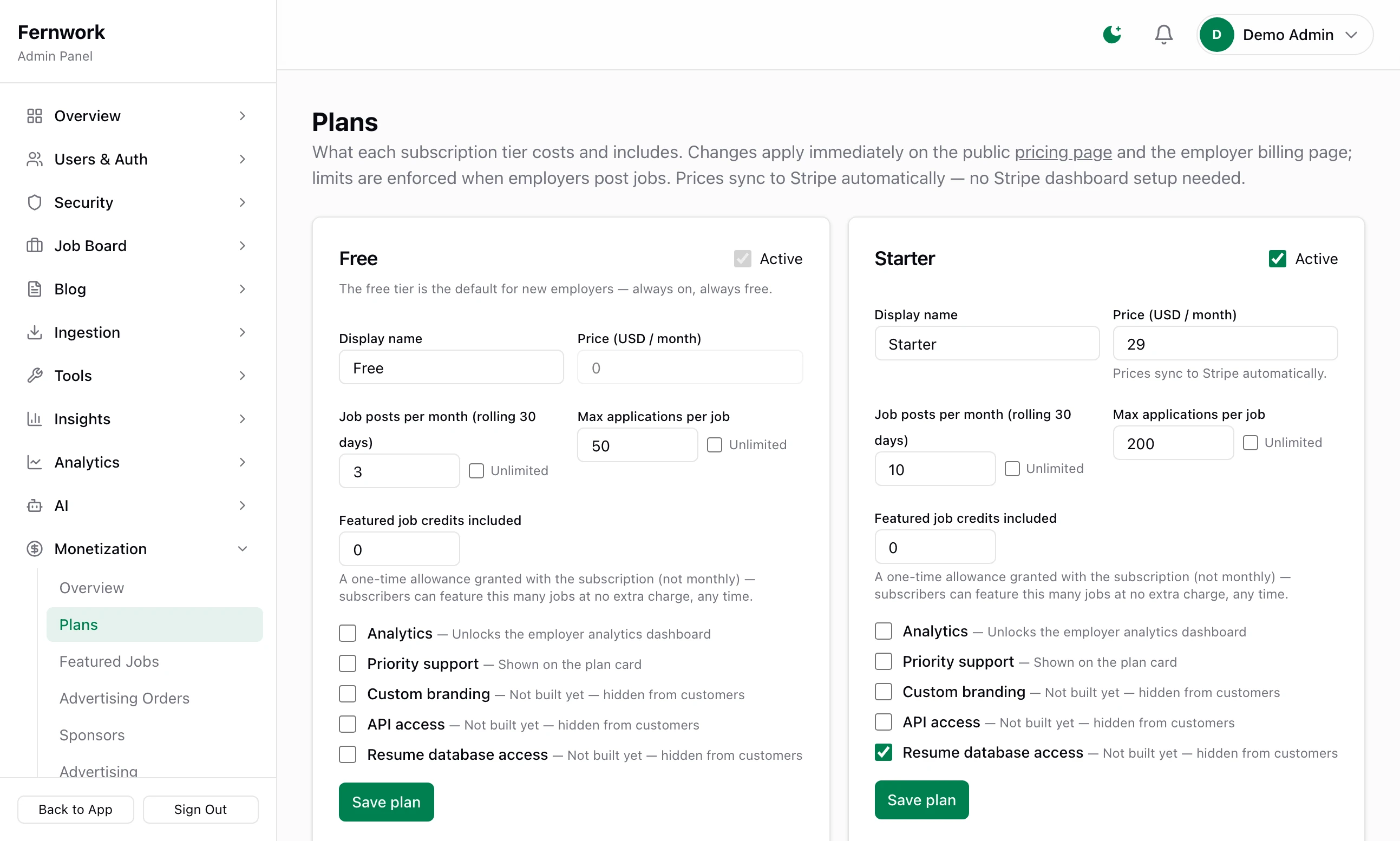
Open Plans under Monetization in the admin sidebar. A plan is a monthly subscription that lets an employer post more jobs and, on the dearer plans, gives them analytics and featured-job credits. Each plan is a card on this page, and what you save here is what the public Pricing page and every employer's Billing page show.
Paid plans need a Stripe key: see Connect Stripe. Until one is saved, a notice on this page reads "Stripe isn't connected yet" and employers cannot subscribe. You can still set everything up first.
The four plans you start with#
Job Lab creates four plans the first time it starts.
| Plan | Price a month | Job posts a month | Applications per job | Featured credits | Analytics | Priority support |
|---|---|---|---|---|---|---|
| Free | Free | 3 | 50 | 0 | No | No |
| Starter | 29 | 10 | 200 | 0 | No | No |
| Professional | 79 | Unlimited | Unlimited | 1 | Yes | Yes |
| Enterprise | 199 | Unlimited | Unlimited | 5 | Yes | Yes |
Prices are in your site currency, US dollars to begin with. Every employer is on Free until they subscribe to something else. In version 1.1.0 there are four plans and all are billed monthly: there is no screen to add a fifth or to set a yearly price. Rename them, reprice them, or switch off the ones you do not want.
There is no charge for posting a job. Posting is limited only by the plan's allowance, and the Free plan has one too.
Change a plan#
Each card is saved on its own.
Step 1: Set the name and the price
Type the Display name employers will see and the Price (USD / month). The label carries your own currency. On the Free plan the price is locked at nothing.
Step 2: Set the limits
Type a number into Job posts per month (rolling 30 days) and Max applications per job, or tick Unlimited beside either. Type how many Featured job credits included the plan gives.
Step 3: Tick what it includes
Analytics and Priority support are the two that do something. The three marked "Not built yet" are covered below.
Step 4: Click Save plan
You see the plan's name and "saved", for example "Starter saved". The Pricing page and employers' Billing pages change at once, and the new limits apply to subscribers the next time they post.
The plan editor, field by field#
Active: whether the plan is on sale. See Switch a plan off. The Free plan's box is locked on, under the line "The free tier is the default for new employers — always on, always free."
Display name: up to 60 characters. It is the name on the plan cards and on Stripe's payment page.
Price (USD / month): what a new subscriber pays each month.
Job posts per month (rolling 30 days): the allowance. How it is counted is below.
Max applications per job: how many applications a job posted by a subscriber can receive. A job seeker who applies after that sees "This job is no longer accepting applications." Jobs brought in from your job sources belong to no employer and have no cap.
Featured job credits included: how many jobs a subscriber can feature without paying. It is one allowance for as long as they subscribe, not a number that refills each month. Featured jobs and credit bundles explains credits.
Analytics: opens the Analytics page of the employer's dashboard. Without it the page reads "Analytics is a premium feature" with a View plans button.
Priority support: adds the line "Priority support" to the plan's card. It changes nothing else, so it is a promise for you to keep.
Ticking Unlimited hides the number box. Unticking it puts 10 in the box for you to change.
How the job-post allowance is counted#
The allowance is a rolling 30 days, not a calendar month and not the employer's billing month.
Every job the employer has created in the last 30 days counts, whatever its state. A draft counts. A job they have closed still counts.
A job is counted from the day it was created, not the day it was published.
A job stops counting 30 days after it was created, and that post becomes free again. Nothing resets on the first of the month or on the renewal date.
An employer who has used their allowance and opens Post a Job sees "You've used this month's job posts", with how many their plan includes, how many they have used and a See plans & upgrade button. The form is not shown.
One other limit applies to everyone, whatever their plan. Max Jobs Per Company, on General under Settings, starts at 50 and counts every job the company has on the board, in any state. An employer who reaches it is told "This company has reached the maximum of 50 jobs."
What happens in Stripe#
You do nothing in Stripe's dashboard. When you click Save plan on a paid plan with Stripe connected, Job Lab:
creates a product in Stripe named after the plan, the first time
creates a monthly price for it, in your site currency
when the amount changes, creates a new price and archives the old one
If Stripe is not connected yet, or cannot be reached, the plan is saved all the same and the price is created when the first employer goes to pay. If the price is archived inside Stripe, Job Lab notices at the next checkout and makes a fresh one.
Change a price#
A new price applies to new subscribers only. Employers who already subscribe go on paying what they signed up at: Stripe keeps charging an archived price to the subscriptions that use it, and Job Lab does not move them.
Switch a plan off#
Untick Active and click Save plan. The plan leaves the Pricing page and Billing, and nobody new can subscribe to it. Employers already on it keep its limits and go on being charged. Nothing is archived in Stripe.
What an employer sees#
The public Pricing page, at /pricing, lists every active plan from cheapest to dearest, then your featured-job prices.
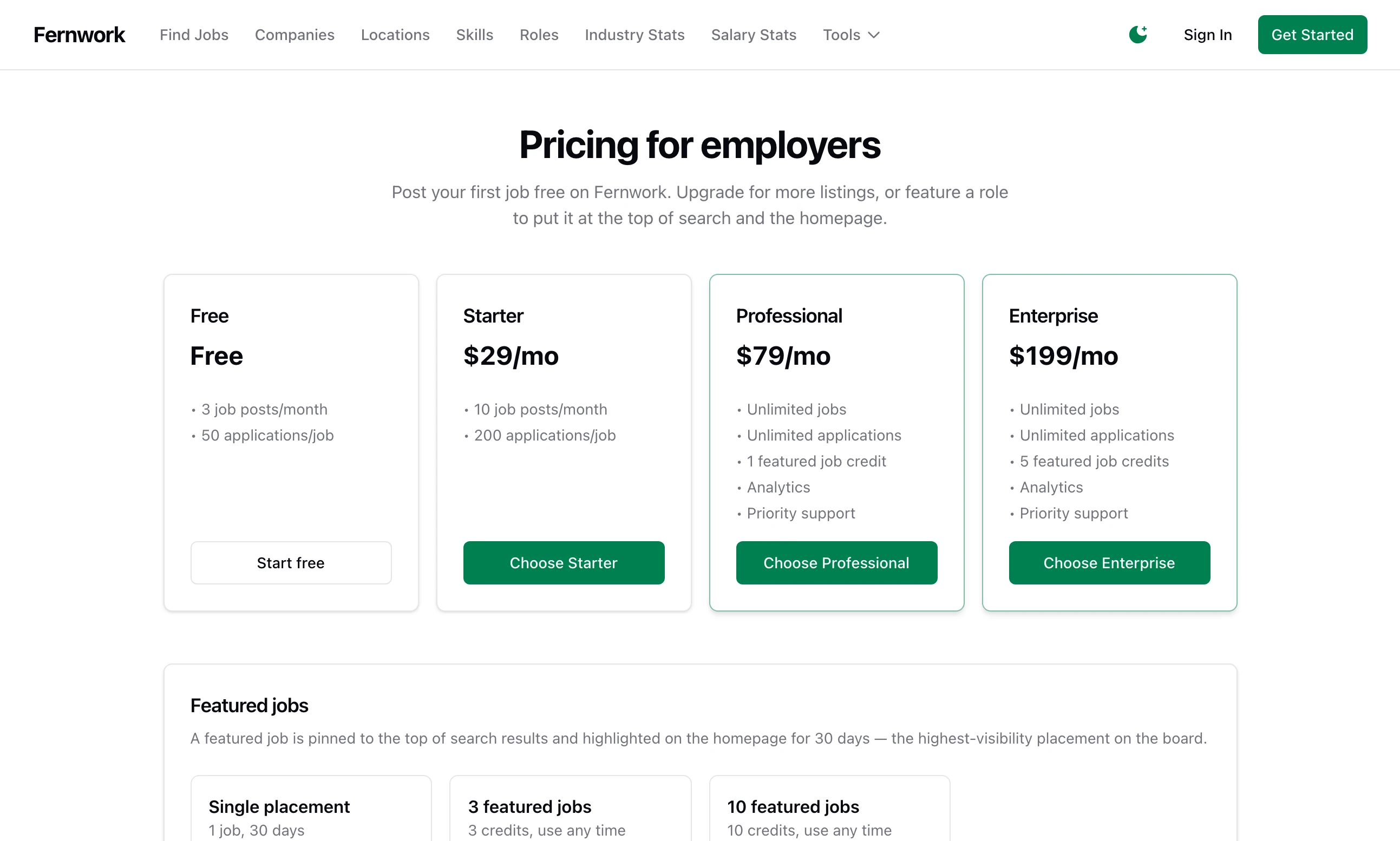
Each card lists what the plan gives, in lines such as "10 job posts/month", "200 applications/job", "1 featured job credit", "Analytics" and "Priority support". A plan that includes featured credits has a highlighted border. The Free plan's button is Start free. A paid plan's button, such as Choose Starter, takes an employer to their Billing page and anyone else to the form that creates an employer account.
An employer manages everything from Billing in their dashboard.
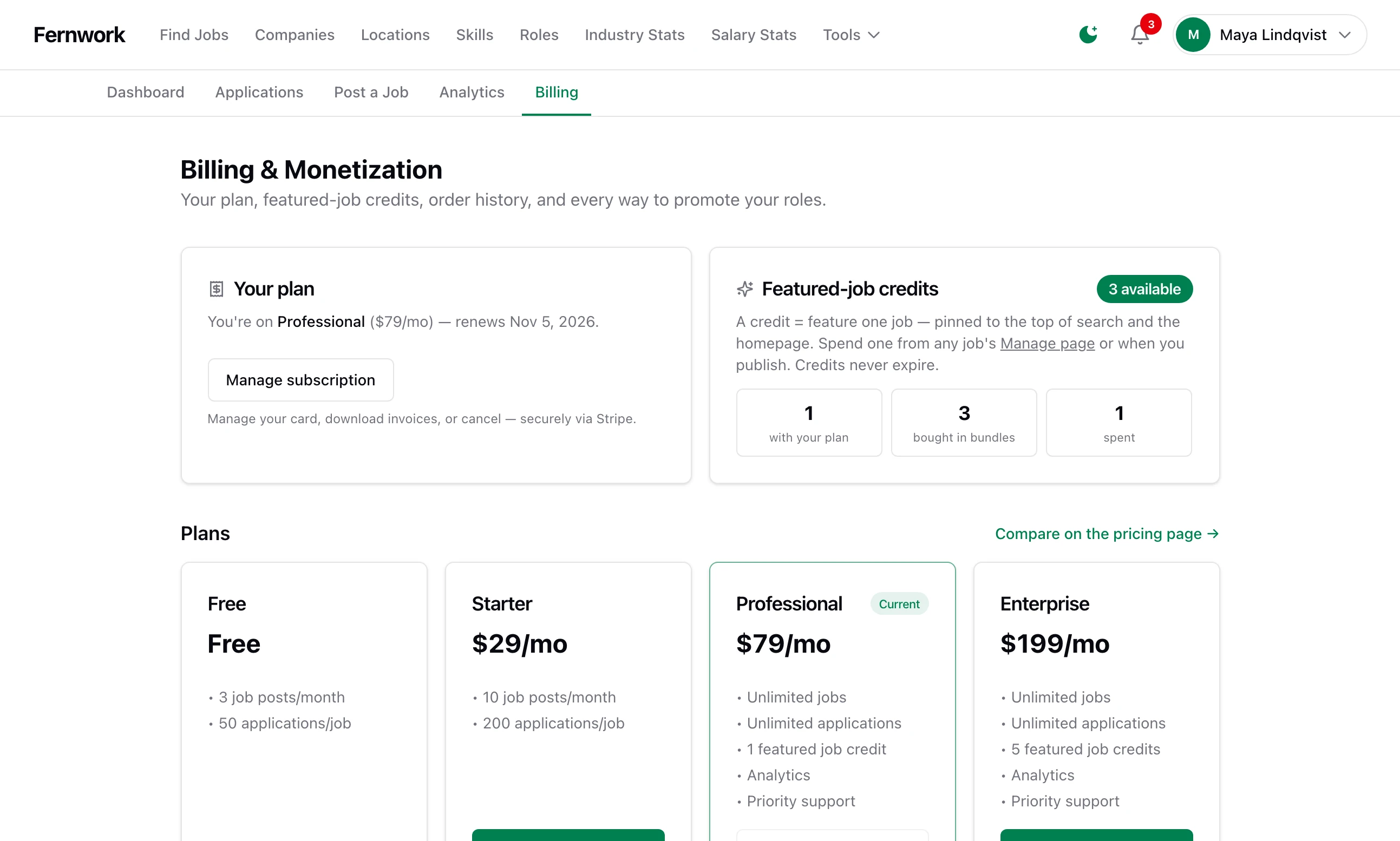
Your plan names the plan they are on. Beside it is their balance of featured-job credits. Under Plans, the card they are on is marked Current. At the foot, Order history lists what they have bought.
Subscribing#
The employer clicks Choose Starter and pays on Stripe's page. Stripe returns them to Billing. The plan starts when Stripe's webhook message reaches your site, normally within seconds, and not before: Add the webhook explains why that matters. They are sent an email headed "Your subscription is active", and you get a Telegram alert if you have set those up.
Switching plan#
An employer who already subscribes sees Switch to Professional on the other plans. Clicking it does not go to Stripe. The subscription is changed where it stands and they see "You're now on Professional — the difference was prorated on your card." Stripe works out the difference for the rest of the paid month and invoices it straight away. On a move to a cheaper plan the difference is a credit, which Stripe sets against their next invoices. The new limits apply at once.
There is no button that moves a subscriber to Free. They cancel instead.
Cancelling#
Manage subscription opens Stripe's customer portal, where the employer changes their card, downloads invoices or cancels. Stripe must have the portal switched on: see The customer portal. Whether a cancelled subscription stops at once or at the end of the paid month is a setting of the portal in Stripe.
When Stripe ends the subscription your site puts the employer on the Free plan and sends them an email headed "Your subscription is canceled". Their jobs stay up. The Free allowance applies to what they post next.
When a renewal fails#
Stripe marks the subscription past_due, tells your site, and tries the card again over the following days. Only a subscription with the status active counts as a plan, so from that moment the employer has the Free plan's limits: the Free allowance for new posts, the Free cap on applications to their jobs, and no analytics. If a retry succeeds the plan comes back by itself. If Stripe gives up and cancels, they stay on Free.
An employer sees "Billing isn't enabled on this site yet."
No Stripe secret key is saved. See Connect Stripe.
An employer sees "You've used all 3 job posts in your plan this month."
They have created that many jobs in the last 30 days, drafts and closed jobs included. They can subscribe to a bigger plan, or wait until the oldest of those jobs is 30 days old. You can raise the number on their plan, which raises it for everyone on that plan.
An employer sees "Your existing subscription uses a different currency"
You changed Site Currency after they subscribed. Stripe cannot move a subscription to another currency. They cancel through Manage subscription, then subscribe again.
Can I charge for each job post?
No. Job Lab has no price per post. An employer pays for a plan, which sets how many jobs they can post, and pays separately to feature a job.
Why does my revenue not include subscriptions?
In version 1.1.0 plan payments are not recorded as transactions on your site. See The Monetization overview.
Stuck on a step? Send a message.