Deploy to a server
Put a Job Lab board on a server of your own with the kit's scripts, from a bare machine to the setup wizard, with HTTPS through Cloudflare.
Updated 9 Oct 2026 · written for Job Lab 1.1.0
On this page
The kit's own scripts, in scripts/prod/, run Job Lab on a server you rent. Four shared services (PostgreSQL, Redis, Meilisearch and MinIO file storage) run once for the whole server, and each board runs in a container of its own behind the nginx web server. This guide takes one board from a bare server to the setup wizard. Every command on the server is run as root.
What you need#
A server running Debian or Ubuntu. The scripts use
systemctland nginx'ssites-availableandsites-enabledfolders. Each board's container may use up to 1 GB of memory and the four services run beside it. The board's image is built on the server itself.Root access over SSH. There is no
sudoin the scripts.A domain name on Cloudflare. The scripts expect Cloudflare in front of the server: see HTTPS below.
Docker, nginx and a few tools. The scripts install nothing. Put these in first:
apt-get update && apt-get install -y nginx git curl openssl unzip
curl -fsSL https://get.docker.com | sh
Prepare the server#
Step 1: Put the code in /opt/joblab
If you have the kit in a git repository of your own, clone it. Later updates pull the
mainbranch fromorigin.From a repositorygit clone YOUR-REPOSITORY-ADDRESS /opt/joblabWith the zip, copy it up from your own computer and unpack it.
On your computerscp job-lab-1.1.0.zip root@YOUR-SERVER-IP:/opt/On the servercd /opt unzip job-lab-1.1.0.zip mv job-lab-1.1.0 joblabStep 2: Check the .dockerignore file is there
Servercat /opt/joblab/.dockerignoreIt should list
.env,sitesandbackupsamong other names. Version 1.1.0 ships the file. A copy of 1.0.0 has none: update before the first build. Why it matters is below.Step 3: Write the shared settings file
The four services read their passwords from
/opt/joblab/.env. Make it with random values:bashcd /opt/joblab cat > .env <<EOF JOBLAB_PG_PASSWORD=$(openssl rand -hex 32) MEILI_MASTER_KEY=$(openssl rand -hex 32) MINIO_ROOT_USER=joblabadmin MINIO_ROOT_PASSWORD=$(openssl rand -hex 32) EOF chmod 600 .envUse letters and digits only, as
-hexgives. The scripts put these values inside addresses, where a/or a+can break them. The services will not start without all four lines.Step 4: Start the shared services
bash./scripts/prod/deploy.sh infra ./scripts/prod/deploy.sh statusstatuslistsjoblab-postgres,joblab-redis,joblab-meiliandjoblab-minio, each marked "Up" and, after a few seconds, "(healthy)". Their data is kept in Docker volumes. Each answers only on the server itself:Service Container Port on the server PostgreSQL 16 joblab-postgres5434 Redis 7 joblab-redis6380 Meilisearch joblab-meili7701 MinIO joblab-minio9002, and 9003 for its console If one of those ports is taken, add a line such as
JOBLAB_PG_PORT=5444to.envand runinfraagain. The other names areJOBLAB_REDIS_PORT,JOBLAB_MEILI_PORT,JOBLAB_MINIO_PORTandJOBLAB_MINIO_CONSOLE_PORT.
Put the certificate in place#
The nginx settings the kit writes for a board name two files, /etc/ssl/joblab/example.com.pem and /etc/ssl/joblab/example.com.key, and new-site.sh switches the board's nginx file on only if both exist. The kit has no Let's Encrypt step and installs no certbot. It is written for a Cloudflare Origin Certificate, which browsers trust only when Cloudflare sits in front of the server.
Step 1: Point the domain at the server through Cloudflare
In Cloudflare's DNS settings for the domain, add an A record for
example.comand one forwwwthat point at the server's IP address, both Proxied.Step 2: Create an origin certificate
In the Cloudflare dashboard open the domain, then SSL/TLS, then Origin Server. Choose Create Certificate. Keep the suggested hostnames,
example.comand*.example.com, and the PEM format. Cloudflare shows an Origin Certificate and a Private Key. The key is shown once.Step 3: Save both on the server
bashmkdir -p /etc/ssl/joblab nano /etc/ssl/joblab/example.com.pem nano /etc/ssl/joblab/example.com.key chmod 600 /etc/ssl/joblab/example.com.keyPaste the certificate into the first file and the private key into the second. The names must be the domain exactly as you will give it to
new-site.sh, with nowww.Step 4: Set the encryption mode
Under SSL/TLS in Cloudflare, set the encryption mode to Full (strict).
Add the board#
The examples use a board called myboard on example.com. The name must start with a letter and hold 2 to 31 lower-case letters and digits, nothing else.
Step 1: Run new-site.sh
A cloned copycd /opt/joblab ./scripts/prod/new-site.sh myboard example.comAn unzipped copycd /opt/joblab SKIP_PULL=1 ./scripts/prod/new-site.sh myboard example.comThe script ends by running
deploy.sh update myboard, andupdatebegins withgit pull. An unzipped copy is not a git repository, so withoutSKIP_PULL=1it stops there with "fatal: not a git repository", after the database and the files have been made. The build takes several minutes. The last lines are a health line for the board and "[joblab] done. Site 'myboard' provisioned."Step 2: Restart the board once
bash./scripts/prod/deploy.sh restart myboardStep 3: Open the site and create the admin
Go to
https://example.com. A board with no admin sends you to/setup. Fill in Your account and click Create admin account, then carry on with the setup wizard.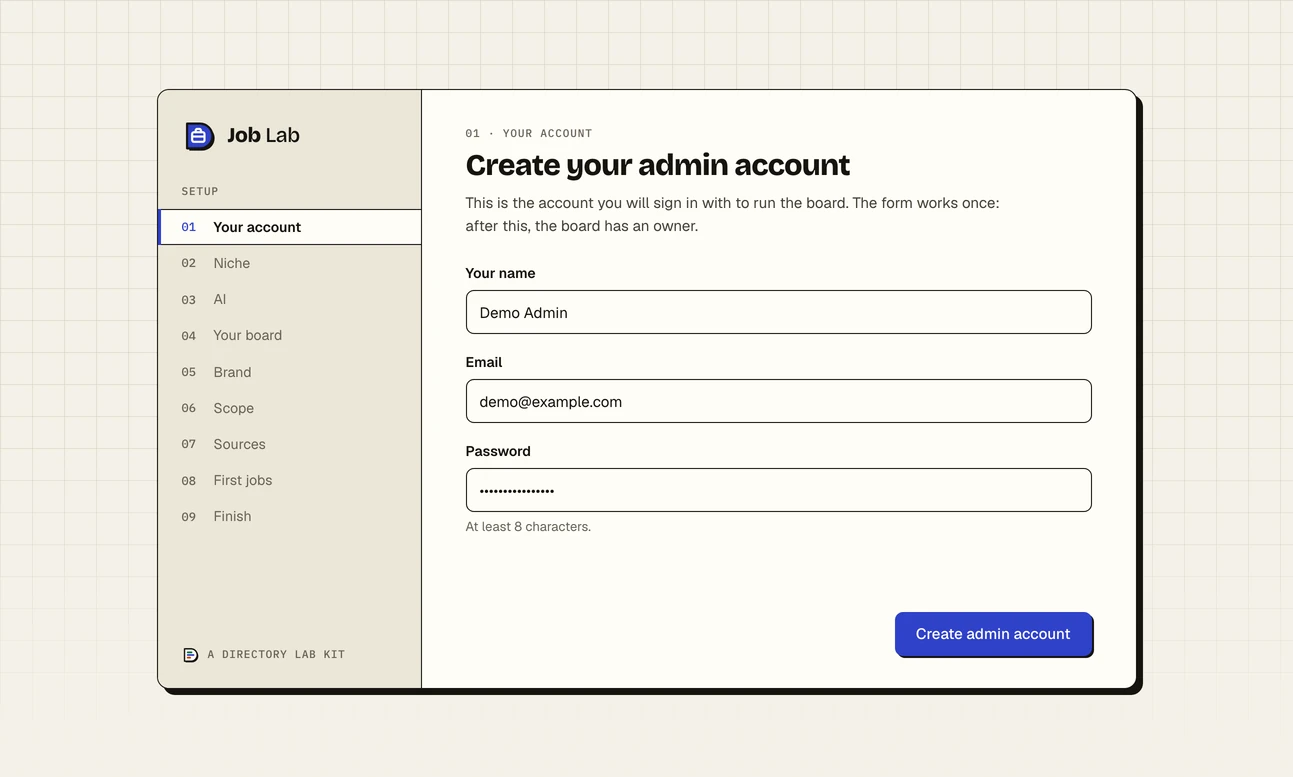
A new install opens on this form. It works once. Step 4: Check its health
Open System Health under Overview in the admin sidebar. Every check under Infrastructure and Automation should pass.
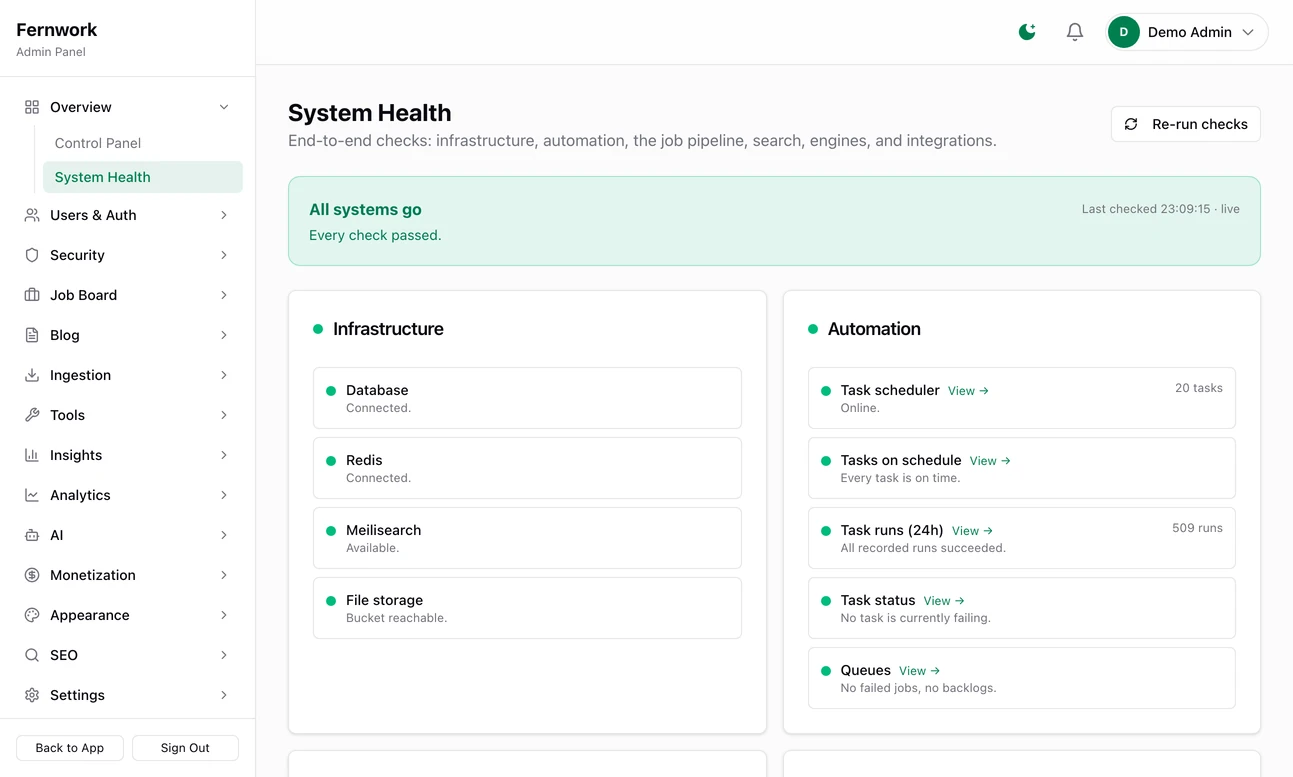
Admin, System Health
update also installs the nightly backup: see Backups, scheduled tasks and health.
What new-site.sh creates#
| What | Where and how |
|---|---|
| A database | joblab_myboard, with a user of the same name and a random password that can use that database only. |
| A Redis database | The lowest free number, 0 for the first board. Redis has 16. |
| A storage bucket | joblab-myboard in MinIO, with an access key that can reach that bucket only. |
| A search index | myboard_jobs, made by the board the first time it starts. |
| A folder | sites/myboard/, holding .env, .port and .domain. |
| A port | 3101 for the first board, 3102 for the next. Only the server itself can reach it: nginx passes visitors to it. |
| An nginx file | /etc/nginx/sites-available/joblab-myboard, linked into sites-enabled if the certificate is there. It sends http and www to https://example.com. |
| An image and a container | Both called joblab-myboard. Docker restarts the container if it stops. |
Each board has an image of its own because the public address is built into the code that browsers download. update reads every line of sites/myboard/.env that starts NEXT_PUBLIC_ and passes it to the build.
Add --no-start to the end of the command and the script makes all of this without building or starting the board. That is for loading a database before the first start: see Updating Job Lab.
Why the .dockerignore file matters#
A build hands Docker the whole of /opt/joblab except what .dockerignore names. Version 1.0.0 had no such file, and without it:
The shared
.env, with the database's master password and the storage root login, is copied into every board's image. The build tool keeps a file called.envbeside the finished site.Every board's
sites/NAME/.envand every backup inbackups/are copied into thejoblab-toolsimage that creates the tables.Builds slow down as the backups grow, and after every nightly backup Docker repeats the full build even when the code has not changed.
The settings file#
new-site.sh writes everything a board needs into sites/myboard/.env.
DATABASE_URL,REDIS_URL, the threeMEILI_lines and the fiveS3_lines: leave them.NEXT_PUBLIC_APP_URLandAUTH_URL: the board's address,https://example.com.APP_SECRETandAUTH_SECRET: random, made for this board. Never changeAPP_SECRETonce keys are saved in the admin.Stripe, email, AI and Google keys are not in the file. Enter them in Integrations & Secrets under Settings, where what you save is used ahead of this file.
The deploy.sh commands#
Run each as ./scripts/prod/deploy.sh COMMAND. Where a board's name is optional, leaving it out means every board.
| Command | What it does |
|---|---|
infra | Starts or refreshes the four shared services. |
update [name] | Pulls new code, then for each board builds its image, replaces its container and brings its tables in line. See Updating Job Lab. |
migrate [name] | Brings the tables in line with the code, and nothing else. |
restart [name] | Restarts the container. No build. |
stop name | Stops and removes the container. The data stays. update brings the board back. |
status | Lists the shared services, then each board with its container's state, its port and the answer from its health address. |
logs name | Shows the last 200 lines the board has written and keeps following. Press Ctrl and C to stop. |
In status, "health 200" means the board answered and nothing is critical. "health 503" means a critical check is failing. "health 000" means nothing answered. The health address explains what is behind the number.
- Backups, scheduled tasks and healthWhat runs every night, how to restore it and how to read the health page.
- Updating Job LabBring in a new version without losing anything.
new-site.sh says "site 'myboard' already exists"
An earlier attempt stopped part of the way through. If it stopped at git pull, the board is made and only the build is missing: run SKIP_PULL=1 ./scripts/prod/deploy.sh update myboard. To clear a board that never worked and start again, remove what the attempt made. This deletes that board's database.
docker rm -f joblab-myboard
docker exec joblab-postgres psql -U joblab -c "DROP DATABASE IF EXISTS joblab_myboard;" -c "DROP ROLE IF EXISTS joblab_myboard;"
rm -rf /opt/joblab/sites/myboard
rm -f /etc/nginx/sites-enabled/joblab-myboard /etc/nginx/sites-available/joblab-myboard
The script said the nginx file was "NOT enabled"
The certificate was not in /etc/ssl/joblab when the script ran. Save the two files as in Put the certificate in place, then run the line the script printed:
ln -sf /etc/nginx/sites-available/joblab-myboard /etc/nginx/sites-enabled/joblab-myboard && nginx -t && systemctl reload nginxThe browser shows 502 Bad Gateway
nginx is running and the board's container is not answering. Run ./scripts/prod/deploy.sh status, then ./scripts/prod/deploy.sh logs myboard to see why it stopped.
I cannot get into the admin
If you have no admin account that works, register an ordinary account on the site, then make it an admin on the server:
cd /opt/joblab
docker run --rm --network joblab-net --env-file sites/myboard/.env joblab-tools pnpm tsx scripts/make-admin.ts [email protected]
It prints "✓ [email protected] is now an admin". Sign out and sign in again. Troubleshooting covers forgotten passwords and lockouts.
Can I run a second board on the same server?
Yes. Save a certificate for its domain and run new-site.sh again with another name. It takes the next port and the next Redis database. In version 1.1.0 the second board's nginx file repeats a line that nginx allows once, real_ip_header, so nginx -t fails with "directive is duplicate" although the script reports the file as enabled. Delete that line from the second file and reload:
sed -i '/^real_ip_header/d' /etc/nginx/sites-available/joblab-second
nginx -t && systemctl reload nginxStuck on a step? Send a message.