Cold outreach to businesses
When a quote request is approved in a city where no business subscribes, Local Lab emails up to three listed businesses there. Who is chosen, what they are sent and where you see it.
Updated 7 Oct 2026 · written for Local Lab 1.2.1
On this page
Open Leads under Quick Actions to see cold outreach: the emails Local Lab sends by itself to listed businesses when a quote request is approved in a city where nobody subscribes to leads. Each email hands the business the request, with the customer's contact details, and invites it to subscribe.
When it happens#
There is no button for it and no setting to switch it off. It runs whenever a request is approved and the request's city has no active lead subscription. That covers all three ways a request gets approved:
you click Approve in the admin
you approve it from Telegram
it arrives while Auto-Approve Lead Requests is ticked
It needs email set up. Once a business subscribes in a city, requests you approve there go to that subscriber and outreach stops for the city.
Who is chosen#
Up to three listings. The number is fixed. A listing can be chosen if it is live, has an email address and has the request's city as its own city or as one of the other cities it serves. Local Lab fills the three places in this order:
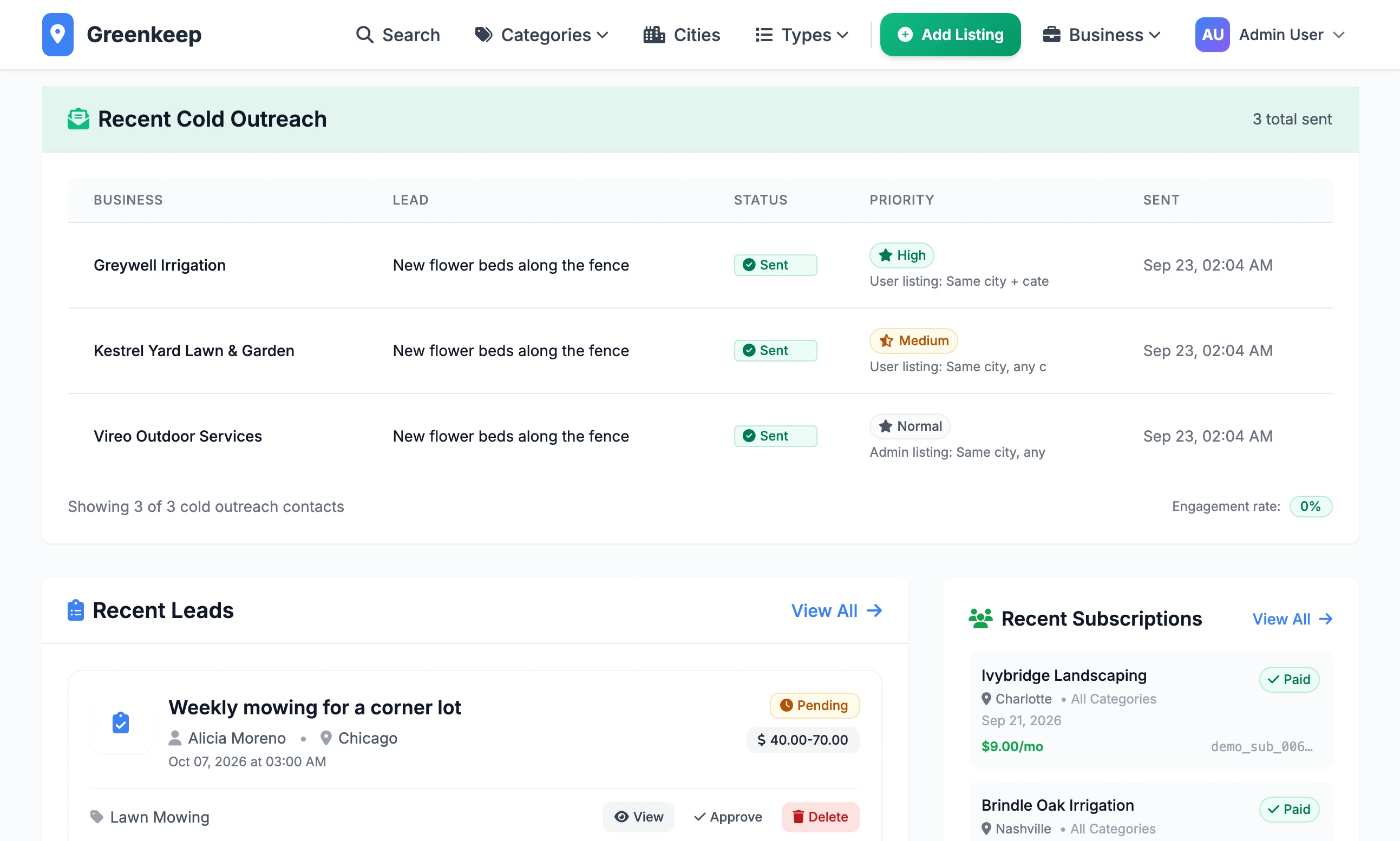
| Order | Listings | Shown on the Leads page as |
|---|---|---|
| 1 | Has an owner, and is in the request's specific service | High |
| 2 | Has an owner, and is in the request's category | Medium |
| 3 | Has an owner, any category | Normal |
| 4 | No owner, in the request's specific service, or in its category when no service was picked | Normal |
| 5 | No owner, any category | Normal |
Within each row, verified listings go first, then the most viewed, then the newest.
What the email says#
The subject is "New Lead Opportunity in Austin", followed by your site's name. The email greets the business by name. It says a request has come in from a customer in that city, that you have no partners there yet and that you are passing it on directly. Then it gives:
the request: title, city, address or area, category, type, budget, timeline and description
the customer's name, email address and phone number, in full
a Get More Leads Like This button that leads to the Leads Suite
a View Full Lead Details button, only when the listing has an owner
It has no unsubscribe link. If the email ad banner is switched on, it carries that too.
Three settings on the General tab of Site Settings shape it:
Contact Email: the address the email is sent from and signed with. If it is empty, the address your site sends mail from is used.
Website Address (Base URL): the start of both buttons' links. If it is empty they point at
https://example.com.The site name: the email is signed "The Greenkeep team", with your own site's name. The kit looks for a contact name to sign with instead, and Site Settings has no such field. To sign it as a person, edit
templates/emails/lead_cold_outreach_simple.html.
When you approve by hand, the customer is then emailed "Your Quote Request is Live", which lists the chosen businesses by name, email address and phone number as the ones their request went to.
How repeats are limited#
A business is never emailed twice about the same request, even when the first try failed.
There is no limit across requests. A business can get one email for every request approved in its city, with no daily cap and no opt-out list.
To stop one business being emailed, clear the Email box on its listing.
Where to see what was sent#
On the Leads page, a Recent Cold Outreach table appears once anything has been sent. It shows the last ten: Business, Lead, Status, Priority and Sent.
On a request's own page, Cold Outreach Contacts lists each business with the address used, why it was chosen and whether it was Email Sent or Failed to Send.
After you approve, the bar across the top says how many went, for example "Lead approved and 3 businesses contacted via cold outreach".
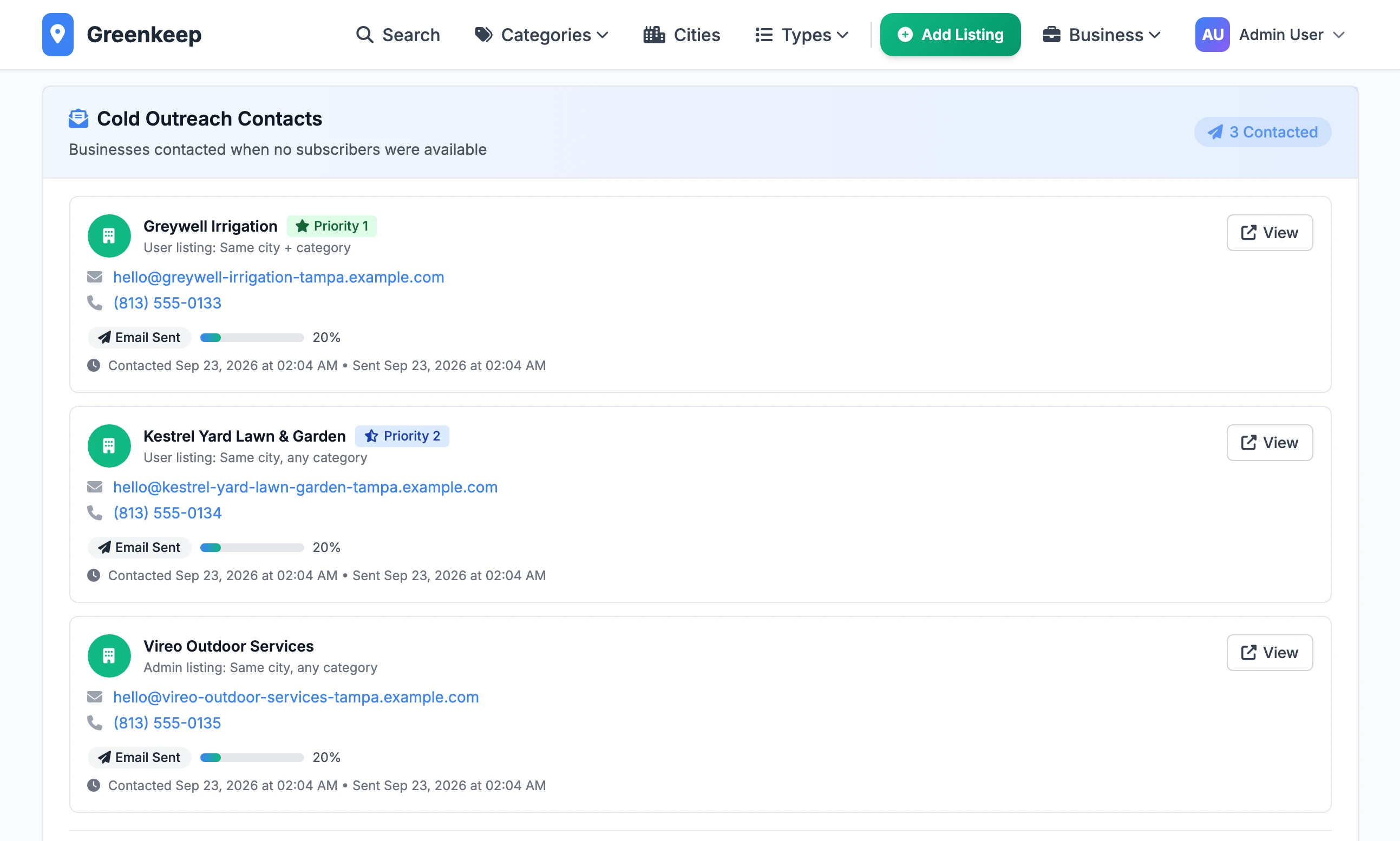
The Opened, Clicked, Viewed Lead and Responded figures and the Engagement rate stay at zero. Nothing in this version records them.
Send it by hand#
A script sends outreach for one request from the terminal. Use it for a request approved before email was working, or to contact three more businesses.
Step 1: Find the request's number
Open the request from Leads. The number is at the end of the address, as in
/admin/leads/12.Step 2: Run the script
In the Local Lab folder, with the virtual environment active:
Mac or LinuxPYTHONPATH=. python scripts/outreach/send_cold_outreach.py --lead-id 12 --liveWindows (Command Prompt)set PYTHONPATH=. python scripts/outreach/send_cold_outreach.py --lead-id 12 --liveWithout the
PYTHONPATHpart it stops with "No module named 'app'".Step 3: Check the list
It prints the request, then the businesses it has chosen and why. If outreach has already gone out for this request it lists who received it and asks "Continue anyway?". Answer
yand it picks up to three businesses that have not been contacted.Step 4: Confirm
Answer
y, then typeSEND. The emails go out, and if at least one was sent the customer gets the "Your Quote Request is Live" email again. The script does not change the request's status and does not check whether the city has subscribers.
| Option | What it does |
|---|---|
--lead-id 12 | The request to send for. |
--latest | Use the newest pending or active request, with no number given. |
--live | Send to the businesses. |
--test | Meant to send previews to a test address. It does not work: see below. |
--yes | Skip the yes or no questions. You still type SEND. |
Can I switch cold outreach off?
There is no setting. It stops for a city as soon as a business subscribes there. You can make that happen without a payment: on the Leads page, add a Manual Subscription for a listing owner in that city.
The bar says "no businesses could be contacted (no email addresses found)"
Either no live listing in that city has an email address, or your site cannot send email. In the second case each business is recorded as Failed to Send, and it counts as contacted: the script will pick different businesses for that request.
Deleting a request says "Failed to delete lead. Please try again."
A request with cold outreach contacts cannot be deleted in this version. Leave it, or use Mark Complete on its page.
Does the business have to be a member of my site?
No. Listings you imported, with no owner, are chosen when fewer than three listings with an owner qualify in the city. The email goes to the address on the listing.
Stuck on a step? Send a message.