Clean up listings with Claude
Have Claude rewrite the description and write selling points for every business in a CSV file, before you import it.
Updated 8 Oct 2026 · written for Local Lab 1.2.1
On this page
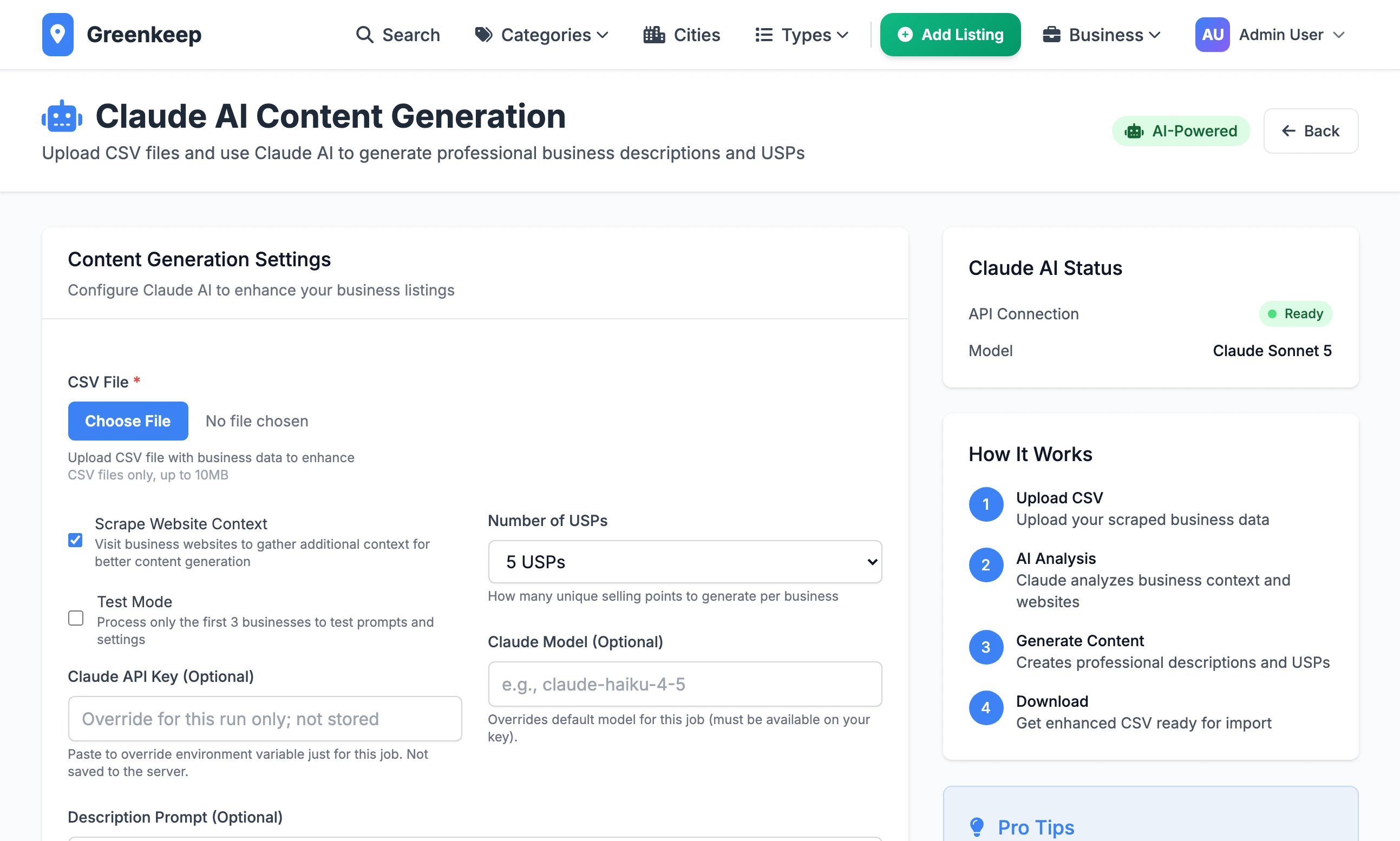
Open Claude AI under Quick Actions to improve the wording in a file of businesses. You upload a CSV and Claude writes a fresh description and a set of selling points for each row. Your browser then downloads a new CSV ready for Import CSV. It works on files, not on listings already in your directory.
Get your Anthropic API key#
Claude is made by Anthropic, and Local Lab reaches it with a key from your own Anthropic account. Anthropic charges that account for what Claude reads and writes. It is a separate account from a Claude chat plan.
Step 1: Open the Claude Console
Sign in, or create an account, at platform.claude.com.
Step 2: Add credit
Open Settings, then Billing. Credit balance is what a run is paid from, so add some before your first run. Spend limits on the same page caps what a month can cost.
Step 3: Create the key
Open Settings, then API keys, and click Create key. Copy the key as soon as it is shown and keep it somewhere safe. It starts with
sk-ant-.
Add the key to Local Lab#
Give the key to Local Lab in one of two ways:
For every run: add a line to the
.envfile in the Local Lab folder, then stop the site and start it again..envCLAUDE_API_KEY=paste-your-key-hereFor one run: paste it into Claude API Key (Optional) on the page. It is used for that run and not stored.
Run a file through Claude#
Step 1: Choose the file
Click Choose File under CSV File and pick a file in the import format, such as the one the Google Places scraper made. Save it as UTF-8 if it has been through Excel.
Step 2: Tick Test Mode
Test Mode processes the first 3 businesses only. Always start with it.
Step 3: Leave the rest as it is
Scrape Website Context ticked and Number of USPs on 5 USPs are sound starting points. Leave the two prompt boxes empty.
Step 4: Click Generate Enhanced Content
The page sits loading. There is no progress bar. Leave the tab open until the browser downloads a file named
claude_enhanced_businesses_followed by the date and time.Step 5: Read the three rows
Open the file. Check the
descriptioncolumn and theusp_columns of the first three rows. If the wording is not what you want, change the prompts and test again.Step 6: Run the whole file
Untick Test Mode, choose the original file again and click Generate Enhanced Content. Keep the computer awake until the download arrives.
What Claude is given#
For each row Claude is sent the business_name, the city, the names in category_1 to category_5 and the existing description.
With Scrape Website Context ticked, Local Lab first opens the address in the row's website column and adds what it finds: the page's own summary and up to 500 characters of its "about" section. A website that does not answer within 10 seconds is skipped and the row carries on without it.
What it writes#
| Column | What goes in |
|---|---|
description | The new description. The built-in prompt asks for 150 to 300 words. |
short_description | The first 100 characters of the new description, with three dots on the end. |
usp_1_title to usp_5_title | A selling point's heading, cut at 50 characters. |
usp_1_description to usp_5_description | One line under the heading, cut at 100 characters. |
usp_1_icon to usp_5_icon | A Font Awesome icon class chosen by Claude, such as fas fa-truck. A tick if it gives none. |
Everything else in the row is copied across as it was, including the categories and the latitude and longitude.
The options#
Scrape Website Context: visit each website for more to go on. Unticking it is faster and gives Claude less to work with.
Test Mode: the first 3 businesses only.
Number of USPs: 3 USPs, 4 USPs or 5 USPs for each business.
Claude API Key (Optional): a key for this run only.
Claude Model (Optional): a model name for this run only. See below.
Description Prompt (Optional): your own instructions for the description. Write
{context}where the business's details should go.USP Prompt (Optional): your own instructions for the selling points.
{context}is the details and{num_usps}the number. Your prompt must still ask for the same layout the built-in one does: a JSON list in which each item has atitle, adescriptionand anicon. If Claude answers in any other shape, the row gets no selling points.
The model#
Local Lab asks for the model claude-sonnet-5 unless told otherwise. There are three ways to change it:
Claude Model (Optional) on the page, for one run.
A line
CLAUDE_MODEL=in.env, for every run.A line
CLAUDE_FALLBACK_MODEL=in.envsets the second choice. It isclaude-haiku-4-5to begin with.
If Anthropic answers that the model you asked for does not exist, Local Lab switches to the second choice for the rest of the run. The page does not tell you it has.
The Claude AI Status box on the right, reading "API Connection: Ready" and "Model: Claude Sonnet 5", is fixed text. It reads the same with no key at all and whatever model you set.
How long it takes#
For each business Local Lab makes one website visit, if that box is ticked, and two requests to Claude: one for the description and one for the selling points. Then it pauses for one second.
The only fixed wait is that one second a business.
The website visit is given up after 10 seconds.
Each request to Claude waits up to 60 seconds for an answer and is tried up to three times if the connection fails or times out.
So the time is mostly the time Claude takes to answer twice, and that is not set by Local Lab. The Pro Tips box on the page says 2 to 5 minutes a business. Nothing in the code waits that long unless requests are timing out. Time your test run of three and multiply.
Progress and where the files are#
Two files are written to the instance folder inside the Local Lab folder:
claude_enhanced_progress_and the date and time: rows are added to this file after every 100 businesses, and once more at the end. If the run is cut short, this file holds everything up to the last complete hundred.claude_enhanced_businesses_and the date and time: the finished file, the same one your browser downloads.
A run cannot be resumed. To carry on after a failure, remove the rows already in the progress file from your original and run the remainder. Then join the two results in a spreadsheet.
Afterwards#
Import the downloaded file on Import CSV. If the businesses are already in your directory, tick Update Existing: the new descriptions and selling points replace the old ones. See updating listings you already have.
"Claude API key not configured. Provide a key in the form or set CLAUDE_API_KEY."
There is no key in .env and none was typed on the page. If you added it to .env while the site was running, stop the site and start it again: the file is read at start-up.
The file came back but the descriptions have not changed
Anthropic refused the requests, and the page does not say so. A wrong key ends this way, and so does hitting Anthropic's rate limit: a refused request is not tried again, the business is left as it was, and the run still reports "Successfully processed". Look in the terminal where the site is running for lines beginning "Claude API HTTP", which give Anthropic's reason.
"Error processing businesses: 'utf-8' codec can't decode"
The file is not saved as UTF-8. In Excel, choose Save As and the format CSV UTF-8. The importer reads Windows files, but this page does not.
Some businesses have a new description but no selling points
Claude's answer for those could not be read as a JSON list, or the request for the selling points was refused when the one for the description was not. A custom USP Prompt that does not ask for JSON causes it on every row. Run those rows again.
Does Claude choose the categories?
No. It reads them and leaves them alone. Categories come from the rules on the Google Places page.
Stuck on a step? Send a message.